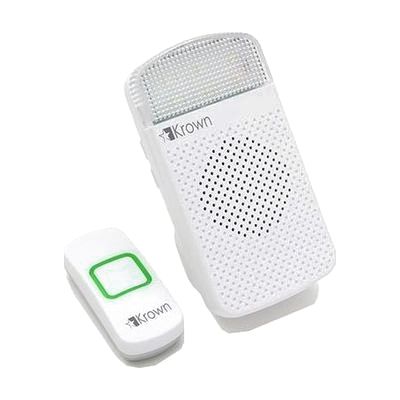
Krown LookOut Wireless Doorbell & Light Flasher for Deaf
by Krown
Price is what the vendor listed when last checked. Confirm it with the vendor before buying.
What it is
Summary
AI-generated from vendor-published content · October 1, 2026
This wireless doorbell set sends a signal from a push button to a receiver that can flash a bright LED, play a chime, or do both. That means someone who can't hear a standard doorbell can still tell when a visitor arrives. The receiver pairs with up to two transmitters, and you can give each one its own chime or choose between a slow and fast flash pattern, so you can tell a front door from a back door. The signal reaches up to 1,000 feet in direct line of sight, and the chime goes up to 90 dB for households with some hearing. If a transmitter's battery runs low, the receiver lights an indicator so you can replace it in time.
Getting it
Try before you buy
Devices like this are often available to borrow through your state's AT Act program — typically free or low-cost — so you can try it before buying or pursuing funding.
Where to get it
This is the vendor WhatCanHelp tracks for this product — it may also be available from other retailers or a local supplier, and prices vary.
How to fund this
These are common places to ask about paying for equipment like this. Each one decides its own eligibility and what it covers, so start by asking them.
Details
Quick Facts Catalog facts · auto-generated
- Type
- Addresses
- Platform
- Age range
- Complexity
- Setup with instructions
- Price
- $61.19
- Funding
- AT Act lending
- Medicaid waiver
- Out of pocket
What setup looks like
- With a guide
- Pair the push button (transmitter) with the receiver following the included instructions. If you add a second transmitter, pair it the same way.
- Choose the receiver's mode: chime only, flashing light only, or both. Pick a chime from the 18 options, and a different chime or flash speed for each transmitter if you use two.
- Mount or place the push button and the receiver, then test the signal from where each will be used. Plan on about 30 minutes in total.
Compare & explore
Sources & fine print
Vendor facts (name, price, platforms, vendor link) sourced from Diglo — view on vendor site (opens in a new tab); last checked October 31, 2026.
Classification & description AI-generated from vendor-published content on October 1, 2026 · confidence: high. Vendor specs may lag; verify before relying on details in a clinical or funding artifact.