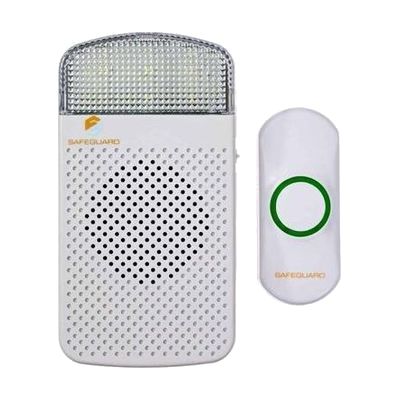
Safeguard Supply Wireless Doorbell + Flashing Strobe Receiver Kit
Price is what the vendor listed when last checked. Confirm it with the vendor before buying.
What it is
Summary
AI-generated from vendor-published content · October 1, 2026
This kit gives you a wireless doorbell button and a plug-in receiver that flashes a bright strobe light as well as sounding a chime, so a visitor at the door is hard to miss. You can run it in sound-only, strobe-only, or sound-plus-strobe mode, and pick from 18 melodies. The button comes already paired to the receiver. Mount it, plug the receiver into a wall outlet, and it works. It's a good fit for someone who can't count on hearing a standard doorbell. You can later add more buttons or receivers from the same product line to cover more doors or rooms. A low-battery light tells you when the button's battery needs replacing.
Getting it
Try before you buy
Devices like this are often available to borrow through your state's AT Act program — typically free or low-cost — so you can try it before buying or pursuing funding.
Where to get it
This is the vendor WhatCanHelp tracks for this product — it may also be available from other retailers or a local supplier, and prices vary.
Wondering how equipment like this gets paid for? See the official funding programs in your state.
Details
Quick Facts Catalog facts · auto-generated
- Type
- Addresses
- Platform
- Age range
- Complexity
- Setup with instructions
- Price
- $54.99
- Funding
- AT Act lending
- Out of pocket
What setup looks like
- With a guide
- Mount the doorbell button by the door and plug the receiver into a standard wall outlet. The button is already paired, so the basic kit should work right away.
- Choose a mode (sound, strobe, or both) and a melody, and test the button from the door.
- To add more buttons, transmitters, or receivers, follow the included programming instructions. Plan on about 30 minutes for a larger setup.
Compare & explore
Sources & fine print
Vendor facts (name, price, platforms, vendor link) sourced from Diglo — view on vendor site (opens in a new tab); last checked October 31, 2026.
Classification & description AI-generated from vendor-published content on October 1, 2026 · confidence: high. Vendor specs may lag; verify before relying on details in a clinical or funding artifact.