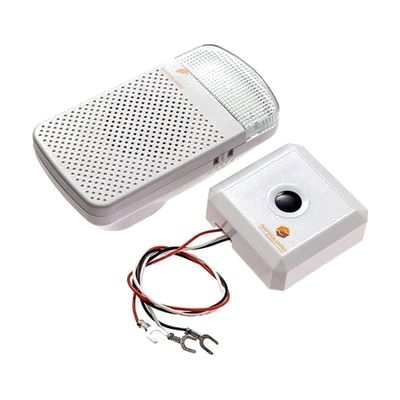
Safeguard Supply Wireless Doorbell Extender & Flash Receiver
Last verified June 16, 2026 · classified April 26, 2026
What it is
Summary
AI-generated from vendor-published content · April 26, 2026
This kit converts a standard wired doorbell into a system that alerts you through a flashing strobe light and/or an audible chime in any room — so you don't have to be near the front door to know someone has arrived. It's designed for people who are deaf, hard of hearing, or who simply can't hear a doorbell from other parts of a home or office. The package includes two components: a wired extender that taps into your existing doorbell system, and a wireless plug-in receiver you place wherever you spend time. The strobe and chime can each be turned on or off independently, and the system is expandable — you can add more receivers or transmitters from the same LRA product line as your needs grow.
Quick Facts Catalog facts · auto-generated
- AT Act lending
- Medicaid waiver
- Out of pocket
What Setup Looks Like
- Out of the box
Plug the wireless receiver into any standard wall outlet — strobe and chime alerts are available immediately once paired. - With a guide
- Connect the doorbell chime extender to your existing wired doorbell terminals using the included instructions — no electrician typically needed for low-voltage doorbell wiring.
- Pair the extender and receiver following the programming steps in the manual.
- Test the system by pressing your existing doorbell button and confirming the receiver flashes and/or chimes — allow 15–30 minutes total. See manufacturer support resources for detailed instructions.
Getting it
Try Before You Buy
Devices like this are often available to borrow through your state's AT Act program — typically free or low-cost — so you can try it before buying or pursuing funding.
Where to Get It
Some links may be affiliate links — WhatCanHelp may earn a small commission from purchases at no extra cost to you. More on affiliates →
As an Amazon Associate we earn from qualifying purchases.
How to Fund This
Equipment like this is often pursued through official state programs. These are common starting points — each program decides its own eligibility and what it covers, so the first step is always a phone call.
Compare & explore
Sources & fine print
Vendor facts (name, price, platforms, vendor link) sourced from SafeGuard Supply — view on vendor site; last verified June 16, 2026.
Classification & description AI-generated from vendor-published content on April 26, 2026 · confidence: high. Vendor specs may lag; verify before relying on details in a clinical or funding artifact.