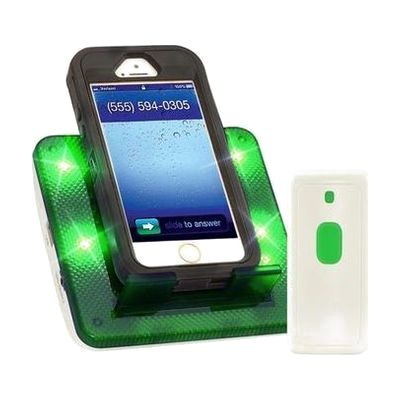
Serene Innovations Central Alert CA-CX with Doorbell
Last verified July 28, 2026 · classified April 26, 2026
What it is
Summary
AI-generated from vendor-published content · April 26, 2026
The Central Alert CA-CX is a notification hub for people who are deaf or hard of hearing that converts incoming calls, texts, and doorbell rings into bright flashing lights and loud audible alerts. It works with both landline and cell phones — a vibration sensor detects when your cell phone rings without needing any app or Bluetooth pairing — and a bed shaker jack lets you connect a shaker (sold separately) to be woken up by nighttime alerts. This is a fairly complete alerting solution out of the box: it includes the phone sensor unit, a doorbell transmitter, power adapter, and cables. One important limitation: the bed shaker is not included and must be purchased separately, so nighttime notification requires an additional purchase.
Quick Facts Catalog facts · auto-generated
- AT Act lending
- Out of pocket
What Setup Looks Like
- Out of the box
Plug landline phone cord into the CA-CX unit and wall jack, or place vibrating cell phone on the sensor pad — lights and loud ring activate automatically on incoming calls. - With a guide
- Connect the doorbell transmitter near your front door following the included instructions — no wiring required.
- If using with a computer or tablet for Skype/video chat alerts, plug the included 2.5mm-to-3.5mm cable into the audio jack.
- Install 4 AA batteries (not included) for backup power in case of outage.
- Allow 20-30 minutes total for full setup of all components. See manufacturer support resources for detailed instructions.
Getting it
Try Before You Buy
Devices like this are often available to borrow through your state's AT Act program — typically free or low-cost — so you can try it before buying or pursuing funding.
Where to Get It
These are the vendors WhatCanHelp tracks for this product — it may also be available from other retailers or a local supplier, and prices vary.
Some links may be affiliate links — WhatCanHelp may earn a small commission from purchases at no extra cost to you. More on affiliates →
As an Amazon Associate we earn from qualifying purchases.
Wondering how equipment like this gets paid for? See the official funding programs in your state.
Compare & explore
Sources & fine print
Vendor facts (name, price, platforms, vendor link) sourced from Serene Innovations — view on vendor site; last verified July 28, 2026.
Classification & description AI-generated from vendor-published content on April 26, 2026 · confidence: high. Vendor specs may lag; verify before relying on details in a clinical or funding artifact.