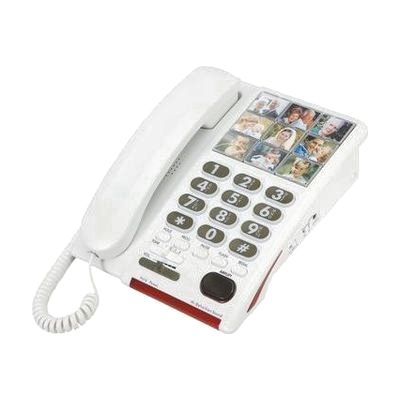
Serene 26dB Amplified Photo Dial Speakerphone for Hearing-Memory Loss
by Serene
Price is what the vendor listed when last checked. Confirm it with the vendor before buying.
Last verified September 18, 2026 · classified April 26, 2026
What it is
Summary
AI-generated from vendor-published content · April 26, 2026
This is a corded landline phone that amplifies incoming audio up to 26dB — roughly 20 times louder than a standard handset — with adjustable speech enhancement tuned specifically to the frequency ranges where people with mild to moderate hearing loss tend to struggle most. It's designed for older adults or anyone who finds conversations hard to follow on regular phones, and includes nine large photo memory buttons for one-touch dialing, which makes it useful for people who also have difficulty remembering phone numbers or navigating menus. The phone runs entirely off the phone line with no power adapter needed, includes visual ring flashers on two sides, and is labeled hearing aid compatible to reduce interference whistling. This is a 26dB incoming amplification phone — it does not amplify your outgoing voice, so callers on the other end will still hear you at normal volume.
Quick Facts Catalog facts · auto-generated
- AT Act lending
- Out of pocket
What Setup Looks Like
- Out of the box
- Plug the phone line cord into the wall jack — the phone powers itself from the line, no outlet needed.
- Set ringer volume and speech enhancement level using the side controls.
- Insert photos into the nine memory button windows and program each speed-dial number.
- With a guide
- Refer to the included manual to configure speech enhancement frequency settings for the user's specific hearing profile.
- Test ring flasher visibility and ringer volume in the room where the phone will be used — adjust as needed. Allow 15–20 minutes total. See manufacturer support resources for detailed instructions.
Getting it
Try Before You Buy
Devices like this are often available to borrow through your state's AT Act program — typically free or low-cost — so you can try it before buying or pursuing funding.
Where to Get It
This is the vendor WhatCanHelp tracks for this product — it may also be available from other retailers or a local supplier, and prices vary.
Some links may be affiliate links — WhatCanHelp may earn a small commission from purchases at no extra cost to you. More on affiliates →
As an Amazon Associate we earn from qualifying purchases.
Wondering how equipment like this gets paid for? See the official funding programs in your state.
Compare & explore
Sources & fine print
Vendor facts (name, price, platforms, vendor link) sourced from Serene — view on vendor site; last verified September 18, 2026.
Classification & description AI-generated from vendor-published content on April 26, 2026 · confidence: high. Vendor specs may lag; verify before relying on details in a clinical or funding artifact.