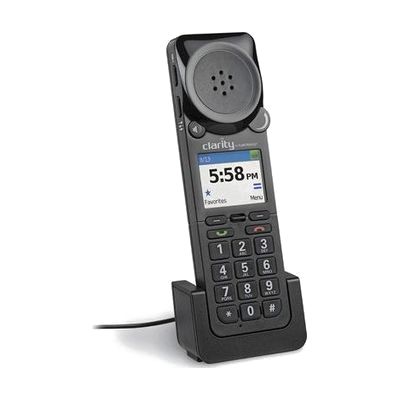
Clarity P-340 Amplified UC Corded USB Handset
by Plantronics
Last verified July 29, 2026 · classified April 26, 2026
What it is
Summary
AI-generated from vendor-published content · April 26, 2026
The Clarity P-340 is an amplified USB handset that plugs directly into a computer to handle voice calls through softphone and unified communications platforms like Zoom, Microsoft Teams, or similar tools. It's designed for someone with hearing loss who struggles to hear callers at typical phone volumes, providing boosted audio output through a traditional handset form factor rather than a headset or speaker. You get the handset itself ready to connect via USB — no additional amplifier hardware is needed, though you will need a softphone or UC application running on your computer to place and receive calls. If you have significant hearing loss, check whether the amplification level (measured in dB gain) meets your specific needs before purchasing, as individual hearing requirements vary.
Quick Facts Catalog facts · auto-generated
- AT Act lending
- Out of pocket
- Vocational rehab
What Setup Looks Like
- Out of the box
Plug the USB handset into a computer USB port — it should be recognized as an audio device automatically. - With a guide
- Set the P-340 as the default audio input and output device in your computer's sound settings.
- Configure your softphone or UC application (e.g., Teams, Zoom) to route calls through the handset.
- Adjust the amplification/volume dial on the handset to a comfortable level — allow 15–20 minutes for initial setup. See manufacturer support resources for detailed instructions.
Getting it
Try Before You Buy
Devices like this are often available to borrow through your state's AT Act program — typically free or low-cost — so you can try it before buying or pursuing funding.
Where to Get It
This is the vendor WhatCanHelp tracks for this product — it may also be available from other retailers or a local supplier, and prices vary.
Some links may be affiliate links — WhatCanHelp may earn a small commission from purchases at no extra cost to you. More on affiliates →
As an Amazon Associate we earn from qualifying purchases.
How to Fund This
Equipment like this is often pursued through official state programs. These are common starting points — each program decides its own eligibility and what it covers, so the first step is always a phone call.
Compare & explore
Sources & fine print
Vendor facts (name, price, platforms, vendor link) sourced from Plantronics — view on vendor site; last verified July 29, 2026.
Classification & description AI-generated from vendor-published content on April 26, 2026 · confidence: high. Vendor specs may lag; verify before relying on details in a clinical or funding artifact.