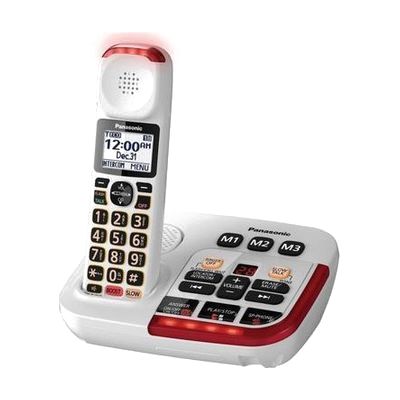
Panasonic KX-TGM420W Amplified Cordless Phone with Answering Machine
by Panasonic
Price is what the vendor listed when last checked. Confirm it with the vendor before buying.
Last verified September 18, 2026 · classified April 26, 2026
What it is
Summary
AI-generated from vendor-published content · April 26, 2026
This cordless phone boosts incoming voice volume by up to 50 dB and rings at 112 dB with a flashing visual alert, making it usable for people who have significant difficulty hearing standard phone calls. It's designed for someone who finds themselves constantly asking callers to repeat themselves, or who misses calls because they can't hear the ringer — particularly older adults with age-related hearing loss. The package includes a built-in answering machine, so it functions as a complete home phone solution without additional equipment. Amplified phones at this volume level can create feedback or distortion if the handset is held too close to a hearing aid, so people who use hearing aids should confirm their device is compatible with the phone's t-coil (telecoil) support before purchasing.
Quick Facts Catalog facts · auto-generated
- AT Act lending
- Medicaid waiver
- Out of pocket
What Setup Looks Like
- Out of the box
- Insert batteries into the handset and place the base on a flat surface near a phone jack and power outlet.
- Press power on — the phone is ready to make and receive calls immediately.
- With a guide
- Set the date/time and configure the answering machine greeting using the menu buttons.
- Adjust the handset volume amplification level to your preferred setting via the boost button.
- Allow 20–30 minutes total following the quick-start guide included in the box.
Getting it
Try Before You Buy
Devices like this are often available to borrow through your state's AT Act program — typically free or low-cost — so you can try it before buying or pursuing funding.
Where to Get It
This is the vendor WhatCanHelp tracks for this product — it may also be available from other retailers or a local supplier, and prices vary.
Some links may be affiliate links — WhatCanHelp may earn a small commission from purchases at no extra cost to you. More on affiliates →
As an Amazon Associate we earn from qualifying purchases.
How to Fund This
Equipment like this is often pursued through official state programs. These are common starting points — each program decides its own eligibility and what it covers, so the first step is always a phone call.
Compare & explore
Sources & fine print
Vendor facts (name, price, platforms, vendor link) sourced from Panasonic — view on vendor site; last verified September 18, 2026.
Classification & description AI-generated from vendor-published content on April 26, 2026 · confidence: high. Vendor specs may lag; verify before relying on details in a clinical or funding artifact.