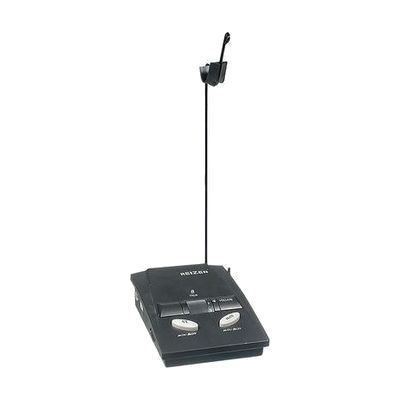
Reizen RE-980L Phone Amplifier with Headset Stand and AutoLift Jack
by Reizen
Last verified June 17, 2026 · classified April 26, 2026
What it is
Summary
AI-generated from vendor-published content · April 26, 2026
This is a telephone amplifier base unit that boosts both incoming and outgoing call volume, designed to sit between a desk phone and a headset. It's aimed at people with hearing loss who struggle to hear callers or be heard clearly during phone conversations — particularly in office or home office settings where a standard phone handset isn't loud enough. The package includes a headset stand to keep cords organized, and the unit has a built-in jack for a separate autolift handset lifter (which raises the handset automatically when a call comes in). One important thing to know: this amplifier requires a compatible Reizen headset to function as intended — that headset is sold separately, so factor in additional cost.
Quick Facts Catalog facts · auto-generated
- AT Act lending
- Out of pocket
- Vocational rehab
What Setup Looks Like
- Out of the box
- Connect the amplifier between your desk phone's handset port and your headset using standard phone cables.
- Set the 6-position selector switch to match your phone type, then adjust volume to a comfortable level.
- With a guide
- Review compatibility list to confirm your phone model (single-line, multi-line, or PBX) is supported before purchasing.
- If using battery power, install two AA batteries; for AC power, connect the included adapter.
- Attach the headset stand and route your headset cord to keep the workspace organized — allow 15–20 minutes total for full setup. See manufacturer support resources for detailed instructions.
Getting it
Try Before You Buy
Devices like this are often available to borrow through your state's AT Act program — typically free or low-cost — so you can try it before buying or pursuing funding.
Where to Get It
Some links may be affiliate links — WhatCanHelp may earn a small commission from purchases at no extra cost to you. More on affiliates →
As an Amazon Associate we earn from qualifying purchases.
How to Fund This
Equipment like this is often pursued through official state programs. These are common starting points — each program decides its own eligibility and what it covers, so the first step is always a phone call.
Compare & explore
Sources & fine print
Vendor facts (name, price, platforms, vendor link) sourced from Reizen — view on vendor site; last verified June 17, 2026.
Classification & description AI-generated from vendor-published content on April 26, 2026 · confidence: high. Vendor specs may lag; verify before relying on details in a clinical or funding artifact.