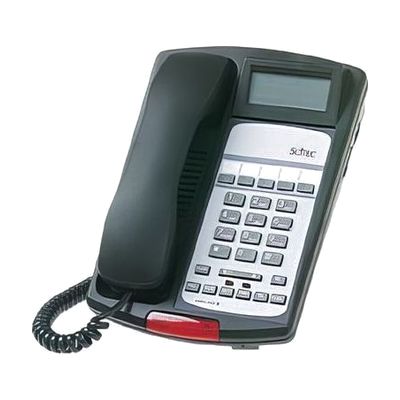
Scitec 55S-c
by Scitec
Last verified July 29, 2026 · classified April 26, 2026
What it is
Summary
AI-generated from vendor-published content · April 26, 2026
The Scitec 55S-c is a single-line office desk phone designed to meet hearing accessibility standards, featuring HAC (Hearing Aid Compatible) and ADA-compliant volume amplification. It's a good fit for someone in a workplace or home office setting who uses a hearing aid or needs louder, clearer audio from a standard telephone — including people who struggle with typical phone volume levels. This is a complete, plug-in telephone that works on its own with a standard phone line, and includes a speakerphone, Caller ID, programmable keys, and a voicemail indicator lightbar. This is a landline/PBX desk phone — it requires a traditional phone line or compatible office phone system (Centrex/PBX) and won't work with VoIP-only setups without an adapter.
Quick Facts Catalog facts · auto-generated
- AT Act lending
- Out of pocket
- Vocational rehab
What Setup Looks Like
- Out of the box
- Plug the phone into a standard telephone wall jack or PBX line.
- Adjust the ringer volume (OFF/HI/LO) and handset volume control to your preferred level — works right away.
- With a guide
- Program the 5 one-touch feature keys using the included instructions (takes roughly 10-15 minutes).
- Configure Caller ID and voicemail retrieval settings per your phone provider's instructions.
- See manufacturer support resources for detailed instructions.
Getting it
Try Before You Buy
Devices like this are often available to borrow through your state's AT Act program — typically free or low-cost — so you can try it before buying or pursuing funding.
Where to Get It
This is the vendor WhatCanHelp tracks for this product — it may also be available from other retailers or a local supplier, and prices vary.
Some links may be affiliate links — WhatCanHelp may earn a small commission from purchases at no extra cost to you. More on affiliates →
As an Amazon Associate we earn from qualifying purchases.
How to Fund This
Equipment like this is often pursued through official state programs. These are common starting points — each program decides its own eligibility and what it covers, so the first step is always a phone call.
Compare & explore
Sources & fine print
Vendor facts (name, price, platforms, vendor link) sourced from Scitec — view on vendor site; last verified July 29, 2026.
Classification & description AI-generated from vendor-published content on April 26, 2026 · confidence: high. Vendor specs may lag; verify before relying on details in a clinical or funding artifact.