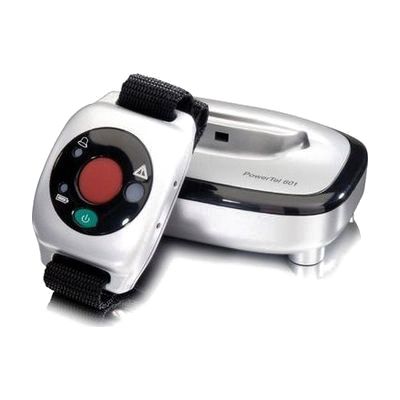
Amplicom PowerTel 601 Wireless DECT Wrist Shaker
by Amplicom
Price is what the vendor listed when last checked. Confirm it with the vendor before buying.
Accessory or replacement part Made to go with another product — check it fits what you have.
Last verified September 18, 2026 · classified April 26, 2026
What it is
Summary
AI-generated from vendor-published content · April 26, 2026
This wrist-worn device vibrates and flashes an LED light when an incoming call arrives on a compatible Amplicom PowerTel series phone, alerting the wearer without relying on sound. It's designed for people who are deaf or hard of hearing and might miss a ringing telephone — particularly useful when someone is in another room, sleeping, or in a noisy environment. The device communicates wirelessly with the base phone via DECT radio, so there's no need to be near the phone to know it's ringing; it works as a standalone accessory that extends the alerting system to your body. One important limitation: full functionality (including answering calls in speakerphone mode and the emergency dialing button) only works when paired with the Amplicom PowerTel 680 specifically — with other PowerTel models, you get vibration and LED alerts only.
Quick Facts Catalog facts · auto-generated
- Out of pocket
What Setup Looks Like
- Out of the box
- Charge the wrist shaker on its included charger base before first use.
- Wear the shaker on your wrist — it will vibrate and flash when a compatible PowerTel phone receives a call.
- With a guide
- Pair the wrist shaker with your PowerTel series phone following the user guide (typically involves a sync button sequence).
- If using with a PowerTel 680, configure the emergency dialing numbers via the phone's settings menu. Allow 15–30 minutes for full setup. See manufacturer support resources for detailed instructions.
Getting it
Many states lend devices like this for free trial periods — find your state's AT lending program.
Where to Get It
This is the vendor WhatCanHelp tracks for this product — it may also be available from other retailers or a local supplier, and prices vary.
Some links may be affiliate links — WhatCanHelp may earn a small commission from purchases at no extra cost to you. More on affiliates →
As an Amazon Associate we earn from qualifying purchases.
Wondering how equipment like this gets paid for? See the official funding programs in your state.
Compare & explore
Sources & fine print
Vendor facts (name, price, platforms, vendor link) sourced from Amplicom — view on vendor site; last verified September 18, 2026.
Classification & description AI-generated from vendor-published content on April 26, 2026 · confidence: high. Vendor specs may lag; verify before relying on details in a clinical or funding artifact.