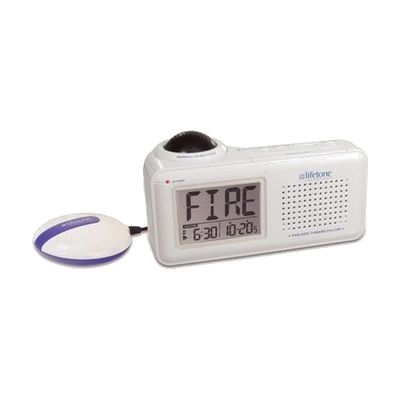
Lifetone HL Bedside Fire Alarm and Clock
by Lifetone
Last verified June 17, 2026 · classified April 26, 2026
What it is
Summary
AI-generated from vendor-published content · April 26, 2026
The Lifetone HL is a bedside device that listens specifically for your existing smoke alarm's 3100 Hz tone and responds with three simultaneous wake-up signals: an 85dB alarm, a flashing backlit display showing 'FIRE', and a bed shaker that vibrates under your mattress or pillow. It's designed for people who are deaf or hard of hearing and may not be reliably awakened by a standard smoke alarm alone — especially during sleep, when even hearing aid wearers typically aren't wearing their devices. This is a complete system that includes the bedside unit and bed shaker, but it does require a separately installed, working smoke alarm already in the room or adjacent area to trigger from. One important limitation: it listens for the sound of your smoke alarm rather than detecting smoke itself, so if your smoke alarm fails or is too far away to be heard by the unit, the Lifetone HL will not alert you.
Quick Facts Catalog facts · auto-generated
- AT Act lending
- Out of pocket
What Setup Looks Like
- Out of the box
- Place the unit on your nightstand and plug it in.
- Connect the bed shaker and tuck it under your mattress or pillow.
- With a guide
- Position the device within listening range of your existing smoke alarm — test by briefly triggering the smoke alarm to confirm the Lifetone HL responds.
- Adjust sensitivity settings if needed based on your home layout. Allow 15–30 minutes for full setup and testing. See manufacturer support resources for detailed instructions.
Getting it
Try Before You Buy
Devices like this are often available to borrow through your state's AT Act program — typically free or low-cost — so you can try it before buying or pursuing funding.
Where to Get It
Some links may be affiliate links — WhatCanHelp may earn a small commission from purchases at no extra cost to you. More on affiliates →
As an Amazon Associate we earn from qualifying purchases.
Wondering how equipment like this gets paid for? See the official funding programs in your state.
Compare & explore
Sources & fine print
Vendor facts (name, price, platforms, vendor link) sourced from Lifetone — view on vendor site; last verified June 17, 2026.
Classification & description AI-generated from vendor-published content on April 26, 2026 · confidence: high. Vendor specs may lag; verify before relying on details in a clinical or funding artifact.