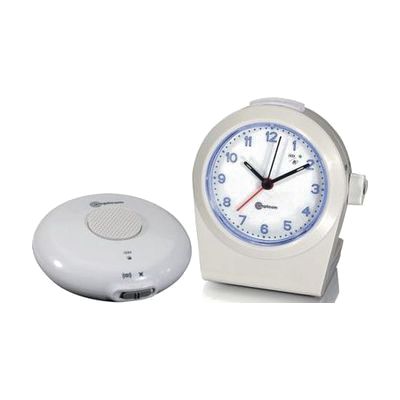
Amplicom Alarm Clock-Ring Signaler with Vibrator
by Amplicom
Last verified July 29, 2026 · classified April 26, 2026
What it is
Summary
AI-generated from vendor-published content · April 26, 2026
This combination alarm clock and telephone ring signaler alerts people who are deaf or hard of hearing using bright flashing LEDs and a wireless vibrating pad that goes under a pillow or mattress. It's designed for someone who can't reliably hear a standard alarm or phone ringing — the vibrating pad and visual flash work together or separately, and it can also connect to a phone line to signal incoming calls. You get a complete kit: the clock unit, the cordless vibrating pad with its own rechargeable battery, and a telephone connector cable. This connects to a traditional landline phone jack, so it won't work as a ring signaler with VoIP-only or cell phone setups without an adapter.
Quick Facts Catalog facts · auto-generated
- AT Act lending
- Out of pocket
What Setup Looks Like
- Out of the box
- Insert batteries and plug in the AC adapter to power the clock.
- Place the wireless vibrating pad under your pillow or mattress and charge it via the included cable.
- Set the alarm time and choose your alert mode (loud tone, vibration, or both) using the front controls.
- With a guide
- Connect the telephone connector cable from the clock unit to your phone's line jack to enable ring signaling.
- Adjust volume (up to 90 dB) and tone settings to your preference using the controls on the unit.
- Refer to the included user's guide to configure snooze delay and alarm pattern options — allow about 20–30 minutes for full setup. See manufacturer support resources for detailed instructions.
Getting it
Try Before You Buy
Devices like this are often available to borrow through your state's AT Act program — typically free or low-cost — so you can try it before buying or pursuing funding.
Where to Get It
This is the vendor WhatCanHelp tracks for this product — it may also be available from other retailers or a local supplier, and prices vary.
Some links may be affiliate links — WhatCanHelp may earn a small commission from purchases at no extra cost to you. More on affiliates →
As an Amazon Associate we earn from qualifying purchases.
Wondering how equipment like this gets paid for? See the official funding programs in your state.
Compare & explore
Sources & fine print
Vendor facts (name, price, platforms, vendor link) sourced from Amplicom — view on vendor site; last verified July 29, 2026.
Classification & description AI-generated from vendor-published content on April 26, 2026 · confidence: high. Vendor specs may lag; verify before relying on details in a clinical or funding artifact.