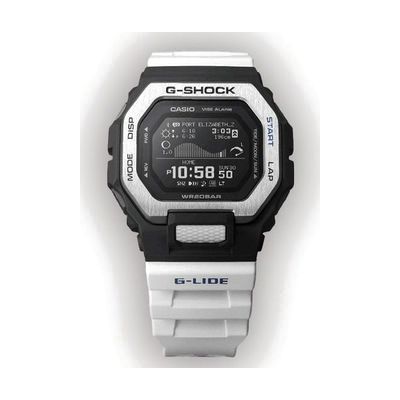
Casio Vibration G-Shock w MIP and Bluetooth (White Band)
by Casio
Last verified July 29, 2026 · classified April 26, 2026
What it is
Summary
AI-generated from vendor-published content · April 26, 2026
This is a rugged G-Shock smartwatch that alerts the wearer through vibration rather than (or in addition to) sound, making it useful for people who are deaf or hard of hearing and need reliable alarm and timer notifications they can feel. It's a good fit for someone who misses audible alarms — in noisy environments, while sleeping, or due to hearing loss — and wants a durable, water-resistant watch they can also wear during sports or outdoor activities. The watch connects via Bluetooth to a companion smartphone app for time sync and extended features, and it includes a large digital display that may also benefit users with low vision who struggle with analog watch faces. Be aware that the vibration alert is a supplemental feature alongside its fitness and outdoor functions — this is not a dedicated alerting device, so the strength and customizability of the vibration may be less robust than purpose-built vibrating watches or alarm systems designed specifically for the deaf community.
Quick Facts Catalog facts · auto-generated
- AT Act lending
- Out of pocket
What Setup Looks Like
- Out of the box
Wear the watch and set the time manually using the buttons — basic timekeeping and vibration alarms work without any additional steps. - With a guide
- Download the Casio G-Shock companion app on your smartphone (iOS or Android).
- Pair the watch via Bluetooth in the app to enable time auto-sync, tide graphs, and training data review.
- Configure alarm and timer vibration settings within the watch menu or app — allow 20–30 minutes to explore all settings. See manufacturer support resources for detailed instructions.
Getting it
Try Before You Buy
Devices like this are often available to borrow through your state's AT Act program — typically free or low-cost — so you can try it before buying or pursuing funding.
Where to Get It
This is the vendor WhatCanHelp tracks for this product — it may also be available from other retailers or a local supplier, and prices vary.
Some links may be affiliate links — WhatCanHelp may earn a small commission from purchases at no extra cost to you. More on affiliates →
As an Amazon Associate we earn from qualifying purchases.
Wondering how equipment like this gets paid for? See the official funding programs in your state.
Compare & explore
Sources & fine print
Vendor facts (name, price, platforms, vendor link) sourced from Casio — view on vendor site; last verified July 29, 2026.
Classification & description AI-generated from vendor-published content on April 26, 2026 · confidence: high. Vendor specs may lag; verify before relying on details in a clinical or funding artifact.