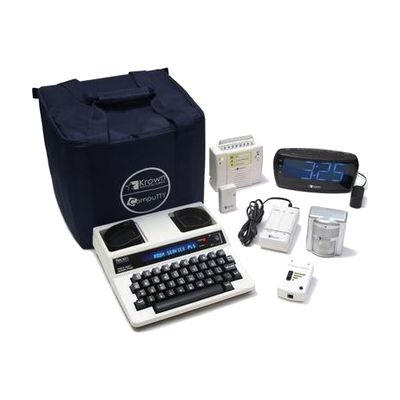
Krown Economy ADA Hotel Kit w/Visual Emergency Notification- 7-Piece
by Krown
Price is what the vendor listed when last checked. Confirm it with the vendor before buying.
What it is
Summary
AI-generated from vendor-published content · October 1, 2026
This 7-piece kit gives a hotel the communication gear it needs for deaf and hard-of-hearing guests under the ADA. It centers on a text telephone (TDD), which lets a guest type messages back and forth over the room phone, plus a visual door knock signaler that flashes a bright LED when someone knocks. The kit also includes a handset amplifier, and it is meant to be set up in any guest room, including ADA mobility rooms, without tools. The TDD has a full 44-key keyboard and a 20-character display, and it runs on AC power or its included rechargeable batteries. This is built for hotel and facility use, so it suits a front desk or housekeeping team stocking rooms more than an individual buying for home.
Getting it
Many states lend devices like this for trial periods, free or at low cost — find your state's AT lending program.
Where to get it
This is the vendor WhatCanHelp tracks for this product — it may also be available from other retailers or a local supplier, and prices vary.
How to fund this
These are common places to ask about paying for equipment like this. Each one decides its own eligibility and what it covers, so start by asking them.
Details
Quick Facts Catalog facts · auto-generated
- Addresses
- Platform
- Age range
- Complexity
- Setup with instructions
- Price
- $829.95
- Funding
- Out of pocket
What setup looks like
- With a guide
- Unpack the kit and check that all seven pieces are there, then charge or install the batteries as directed.
- Place the TDD by the room phone and connect it to the handset (it accepts round or square handsets), then set up the door knock signaler and the remaining devices in the room.
- Test the TDD with the front desk and check that the door signaler lights when someone knocks. Plan on about 30 minutes per room type.
Compare & explore
Sources & fine print
Vendor facts (name, price, platforms, vendor link) sourced from MaxiAids — view on vendor site (opens in a new tab); last checked November 2, 2026.
Classification & description AI-generated from vendor-published content on October 1, 2026 · confidence: medium. Vendor specs may lag; verify before relying on details in a clinical or funding artifact.