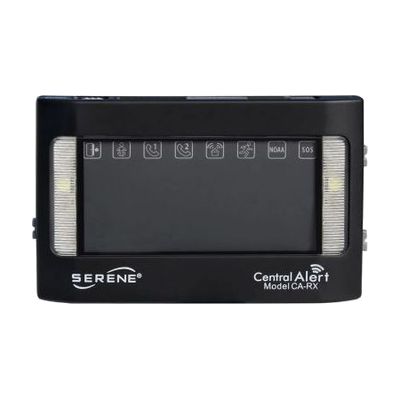
Serene Central Alert Remote Receiver
Price is what the vendor listed when last checked. Confirm it with the vendor before buying.
Accessory or replacement part Made to go with another product — check it fits what you have.
Last verified September 19, 2026 · classified April 26, 2026
What it is
Summary
AI-generated from vendor-published content · April 26, 2026
This is an add-on wireless receiver for the Serene CentralAlert CA-360 home alerting system, designed to extend coverage so you can receive visual and vibration alerts in parts of your home away from the main unit. It displays large visual icons and flashes when alerts are triggered — including doorbells, smoke detectors, phone calls, or motion sensors connected to the CA-360 — and includes an output jack for a bed shaker for nighttime alerting. It's intended for people who are deaf or hard of hearing and need to stay aware of household sounds and events regardless of where they are in their home. This is an accessory, not a standalone product — it only works as part of a CA-360 system and requires that base unit to function. Note that the required rechargeable AA batteries are not included, and real-world wireless range will vary with wall construction and interference.
Quick Facts Catalog facts · auto-generated
- Out of pocket
What Setup Looks Like
- Out of the box
Plug in the AC adapter and the receiver will begin pairing with the CA-360 base unit automatically within range. - With a guide
- Confirm the CA-360 base unit is already installed and operational before adding this receiver.
- Place the CA-RX within 200 feet of the CA-360, avoiding metallic surfaces that can block the signal.
- Adjust volume and check that alert icons display correctly for each sensor type connected to the base unit — allow 15–30 minutes to verify all alert types. See manufacturer support resources for detailed instructions.
Getting it
Many states lend devices like this for free trial periods — find your state's AT lending program.
Where to Get It
This is the vendor WhatCanHelp tracks for this product — it may also be available from other retailers or a local supplier, and prices vary.
Some links may be affiliate links — WhatCanHelp may earn a small commission from purchases at no extra cost to you. More on affiliates →
As an Amazon Associate we earn from qualifying purchases.
Wondering how equipment like this gets paid for? See the official funding programs in your state.
Compare & explore
Sources & fine print
Vendor facts (name, price, platforms, vendor link) sourced from Serene Innovations — view on vendor site; last verified September 19, 2026.
Classification & description AI-generated from vendor-published content on April 26, 2026 · confidence: high. Vendor specs may lag; verify before relying on details in a clinical or funding artifact.