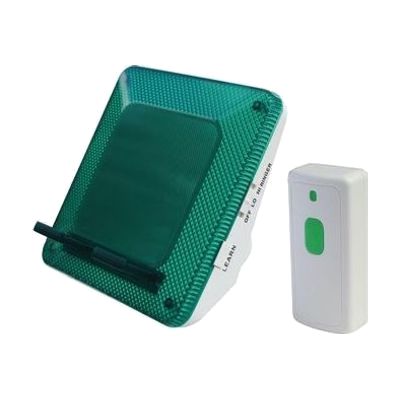
Serene CentralAlert Mini Notification Package
Price is what the vendor listed when last checked. Confirm it with the vendor before buying.
What it is
Summary
AI-generated from vendor-published content · October 1, 2026
The CentralAlert Mini gives you a flashing light and a ringer for phone calls, plus a wireless doorbell, so you notice calls and visitors without needing to hear a ring. The phone unit works on its own, with no extra receiver, and it can alert for landline calls, cell calls, texts, Skype, and FaceTime. Each kind of alert has its own flashing pattern, and the ring tones are adjustable, so you can tell what is happening by sight. It also has a USB port for charging a smartphone. It's a good fit for someone with hearing loss who wants basic coverage for two things, the phone and the front door. Battery backup runs on alkaline batteries, which are not included.
Getting it
Try before you buy
Devices like this are often available to borrow through your state's AT Act program — typically free or low-cost — so you can try it before buying or pursuing funding.
Where to get it
These are the vendors WhatCanHelp tracks for this product — it may also be available from other retailers or a local supplier, and prices vary.
How to fund this
These are common places to ask about paying for equipment like this. Each one decides its own eligibility and what it covers, so start by asking them.
Details
Quick Facts Catalog facts · auto-generated
- Type
- Addresses
- Platform
- Age range
- Complexity
- Setup with instructions
- Price
- $124.95
- Funding
- AT Act lending
- Medicaid waiver
- Out of pocket
What setup looks like
- With a guide
- Place the phone unit near your landline or cell phone and plug it in, then follow the instructions to set it up for your phone type.
- Mount or place the wireless doorbell button by your door and pair it with the unit.
- Choose your ring tones and test each alert (phone call, text, doorbell) so you know the flashing patterns. Plan on about 30 minutes.
Compare & explore
Sources & fine print
Vendor facts (name, price, platforms, vendor link) sourced from Independent Living Aids — view on vendor site (opens in a new tab); last checked November 4, 2026.
Classification & description AI-generated from vendor-published content on October 1, 2026 · confidence: high. Vendor specs may lag; verify before relying on details in a clinical or funding artifact.