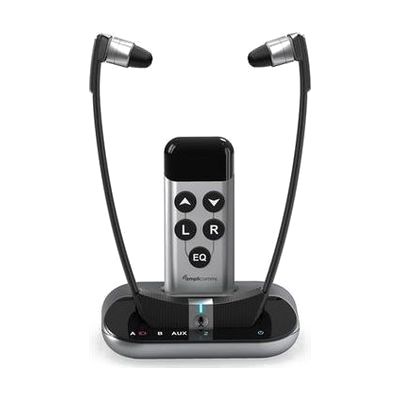
Amplicomms TV3500 TV Listening System | Amplify TV Sound
by Amplicom
Last verified July 28, 2026 · classified May 31, 2026
What it is
Summary
AI-generated from vendor-published content · May 31, 2026
The TV3500 is a wireless headset system that pulls audio directly from a television and amplifies it up to 125dB — loud enough for people with moderate-to-severe hearing loss who find TV volume either inadequate or socially disruptive to others in the room. The receiver unit is worn around the neck or on the ears and connects to the TV via optical cable, 3.5mm jack, or a base microphone that just sits near the TV speakers (no cables at all). Four sound profiles let the user shape audio for speech clarity, and a dedicated microphone button briefly switches input to the room so the wearer can catch a conversation without removing the device. At just over two ounces, it's built for extended wear during long viewing sessions. Setup is straightforward for most users, though pairing the transmitter base and choosing the right audio output on the TV may take a few minutes of troubleshooting — older TVs with limited audio output options are occasionally a poor fit.
Quick Facts Catalog facts · auto-generated
- AT Act lending
- Insurance
- Out of pocket
What Setup Looks Like
- Out of the box
Place the base unit near or connected to the TV, charge the headset, and power both on — audio plays through the headset without further configuration. - With a guide
- Connect the base to the TV via optical (TOSLINK) or 3.5mm cable for best audio quality.
- Select the matching audio output in the TV's settings menu if using a wired connection.
- Use the remote to set preferred sound profile and volume balance — allow 15–20 minutes to find a comfortable profile. See manufacturer support resources for detailed instructions.
Getting it
Try Before You Buy
Devices like this are often available to borrow through your state's AT Act program — typically free or low-cost — so you can try it before buying or pursuing funding.
Where to Get It
This is the vendor WhatCanHelp tracks for this product — it may also be available from other retailers or a local supplier, and prices vary.
Some links may be affiliate links — WhatCanHelp may earn a small commission from purchases at no extra cost to you. More on affiliates →
As an Amazon Associate we earn from qualifying purchases.
Wondering how equipment like this gets paid for? See the official funding programs in your state.
Compare & explore
Sources & fine print
Vendor facts (name, price, platforms, vendor link) sourced from Amplicom — view on vendor site; last verified July 28, 2026.
Classification & description AI-generated from vendor-published content on May 31, 2026 · confidence: high. Vendor specs may lag; verify before relying on details in a clinical or funding artifact.