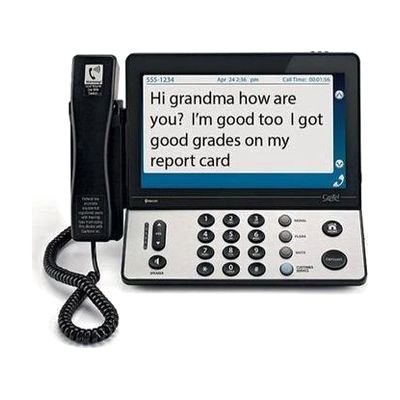
CapTel 2400i Telephone | 10.1" Touchscreen | Captions Calls Clearly
by Ultratec
Price is what the vendor listed when last checked. Confirm it with the vendor before buying.
Last verified September 16, 2026 · classified May 31, 2026
What it is
Summary
AI-generated from vendor-published content · May 31, 2026
The CapTel 2400iBT displays real-time word-for-word captions of what the other person is saying during a phone call, using an internet-connected captioning service — essentially live subtitles for telephone conversations on a 10.1-inch color touchscreen. It's designed for someone with hearing loss who can still speak on the phone but struggles to follow what the other person is saying, whether they use hearing aids, a cochlear implant, or neither. The phone itself handles voice and captions simultaneously, and it Bluetooth-pairs with hearing aids, neckloops, and cochlear implant accessories for cleaner sound delivery. At $75 this is heavily subsidized through the federal Telecommunications Relay Services program — the captioning service itself is free and funded that way. The captioning service requires a broadband internet connection, captions are only available for US calls, and the Bluetooth pairing is for hearing devices only — it cannot connect to a mobile phone.
Quick Facts Catalog facts · auto-generated
- Insurance
- Medicaid waiver
- Out of pocket
What Setup Looks Like
- Out of the box
Connect the phone to a landline jack and ethernet/broadband router to start making captioned calls. - With a guide
- Pair Bluetooth hearing aids or cochlear implant accessories using the phone's Bluetooth settings menu.
- Set up the built-in answering machine and dial-by-picture contacts through the touchscreen interface.
- Allow 15–30 minutes total following the included quick-start guide. See manufacturer support resources for detailed instructions.
Getting it
Many states lend devices like this for free trial periods — find your state's AT lending program.
Where to Get It
This is the vendor WhatCanHelp tracks for this product — it may also be available from other retailers or a local supplier, and prices vary.
Some links may be affiliate links — WhatCanHelp may earn a small commission from purchases at no extra cost to you. More on affiliates →
As an Amazon Associate we earn from qualifying purchases.
How to Fund This
Equipment like this is often pursued through official state programs. These are common starting points — each program decides its own eligibility and what it covers, so the first step is always a phone call.
Compare & explore
Sources & fine print
Vendor facts (name, price, platforms, vendor link) sourced from Ultratec — view on vendor site; last verified September 16, 2026.
Classification & description AI-generated from vendor-published content on May 31, 2026 · confidence: high. Vendor specs may lag; verify before relying on details in a clinical or funding artifact.