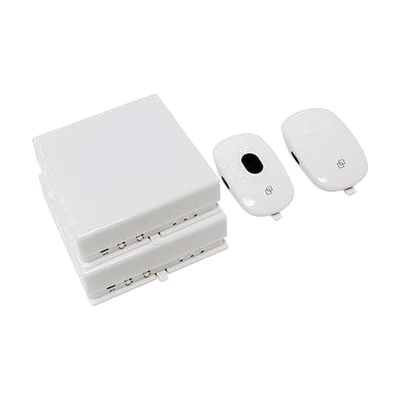
SquareGlow HomeKit | Deaf Doorbell, Phone / VP Flasher Kit
by SquareGlow
$264.99 ▲ $5.00 (2%)
Price is what the vendor listed when last checked. Confirm it with the vendor before buying.
Last verified September 16, 2026 · classified May 31, 2026
What it is
Summary
AI-generated from vendor-published content · May 31, 2026
This kit converts doorbell rings and incoming phone or videophone calls into bright flashing light alerts throughout the home. The package includes two wireless flash receivers, a doorbell transmitter, and a phone signaler that connects via standard RJ-11 cable — everything needed to cover both entry alerts and telephone notifications out of the box. Each receiver flashes in one of seven selectable colors, letting you tell at a glance whether someone's at the door or on the phone, and the wireless range spans up to 600 feet. It's designed for Deaf and hard-of-hearing users who rely on visual cues rather than auditory alerts, and the unlimited pairing capability means you can add more receivers to cover a larger home without replacing the system. The phone signaler requires a physical RJ-11 landline or VRS/videophone connection — it won't work with a mobile-only household or a VoIP line that lacks a phone jack.
Quick Facts Catalog facts · auto-generated
- AT Act lending
- Medicaid waiver
- Out of pocket
- Vocational rehab
What Setup Looks Like
- Out of the box
- Install the preloaded batteries in each transmitter — they come preinstalled.
- Plug the flashing receivers into wall outlets via the included USB cables or load AA batteries.
- Press the doorbell button near each receiver to pair them using the frequency code settings.
- With a guide
- Connect the phone/VP signaler to the RJ-11 jack on your landline or videophone.
- Pair the phone signaler to its designated receiver and select a unique flash color to distinguish it from doorbell alerts.
- Test all transmitters and confirm flash colors and volume settings — allow 30–45 minutes total. See manufacturer support resources for detailed instructions.
Getting it
Try Before You Buy
Devices like this are often available to borrow through your state's AT Act program — typically free or low-cost — so you can try it before buying or pursuing funding.
Where to Get It
This is the vendor WhatCanHelp tracks for this product — it may also be available from other retailers or a local supplier, and prices vary.
Some links may be affiliate links — WhatCanHelp may earn a small commission from purchases at no extra cost to you. More on affiliates →
As an Amazon Associate we earn from qualifying purchases.
How to Fund This
Equipment like this is often pursued through official state programs. These are common starting points — each program decides its own eligibility and what it covers, so the first step is always a phone call.
Compare & explore
Sources & fine print
Vendor facts (name, price, platforms, vendor link) sourced from SquareGlow — view on vendor site; last verified September 16, 2026.
Classification & description AI-generated from vendor-published content on May 31, 2026 · confidence: high. Vendor specs may lag; verify before relying on details in a clinical or funding artifact.