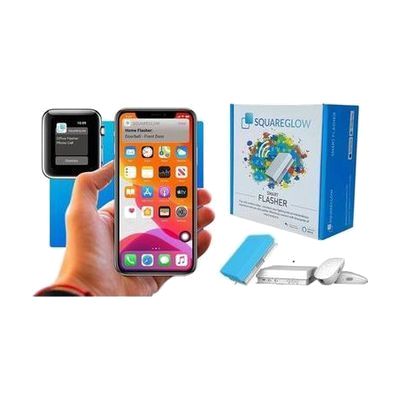
SquareGlow Smart WiFi Home Kit
by SquareGlow
Price is what the vendor listed when last checked. Confirm it with the vendor before buying.
What it is
Summary
AI-generated from vendor-published content · October 1, 2026
This kit turns sounds you might miss into flashing lights and phone alerts. A doorbell button and a phone/videophone signaler send a signal to two Wi-Fi flashers, which you can place in up to two rooms. Each flasher can show one of seven light colors, so you can tell the doorbell from the phone at a glance. The free SquareGlow iPhone and Android apps send notifications to your phone and let you set up schedules and scenes. Signals travel up to about 200 yards (600 feet), and you can add more SquareGlow flashers, doorbells, or accessories later. It's a good fit for someone who is deaf or hard of hearing and wants a full set of visual alerts for the home. The flashers run on USB power, so each one needs to sit near an outlet.
Getting it
Try before you buy
Devices like this are often available to borrow through your state's AT Act program — typically free or low-cost — so you can try it before buying or pursuing funding.
Where to get it
This is the vendor WhatCanHelp tracks for this product — it may also be available from other retailers or a local supplier, and prices vary.
How to fund this
These are common places to ask about paying for equipment like this. Each one decides its own eligibility and what it covers, so start by asking them.
Details
Quick Facts Catalog facts · auto-generated
- Type
- Addresses
- Platform
- Age range
- Complexity
- Setup with instructions
- Price
- $365.99
- Funding
- AT Act lending
- Medicaid waiver
- Out of pocket
What setup looks like
- With a guide
- Plug each flasher into power with the included USB cable and adapter, and place them in the rooms where you want alerts.
- Mount the doorbell by the door and attach the phone/videophone signaler to your phone using the included mounting accessories.
- Install the free SquareGlow app, connect the flashers to your Wi-Fi, then pick light colors for the doorbell and phone and set any schedules. Plan on about 30-45 minutes.
Compare & explore
Sources & fine print
Vendor facts (name, price, platforms, vendor link) sourced from Diglo — view on vendor site (opens in a new tab); last checked October 31, 2026.
Classification & description AI-generated from vendor-published content on October 1, 2026 · confidence: medium. Vendor specs may lag; verify before relying on details in a clinical or funding artifact.