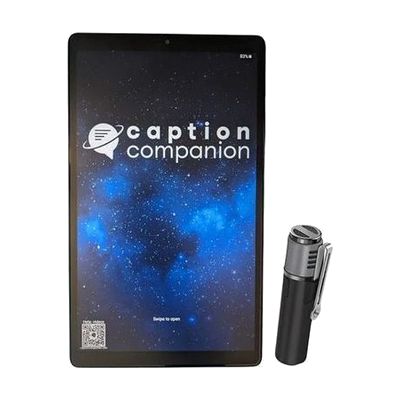
Caption Companion | Live Transcription Tablet with SmartMic
Last verified June 16, 2026 · classified May 31, 2026
What it is
Summary
AI-generated from vendor-published content · May 31, 2026
The Caption Companion is a dedicated 8-inch tablet with a pre-paired wireless lapel microphone that converts live speech to on-screen text in real time using offline AI — no internet, account, or subscription required. It's designed for Deaf and hard-of-hearing people in face-to-face communication settings: classrooms, workplace meetings, appointments, religious services, and similar environments where a person needs to read what's being said as it happens. The wireless SmartMic clips onto the speaker's clothing and can transmit from up to 100 feet away, which makes it practical in larger rooms without requiring the speaker to hover near the tablet. Everything ships pre-configured and ready to use out of the box — you don't need IT support or pairing steps. The main limitation is display size: an 8-inch screen works for one-on-one conversations but may not be readable from across a table in a group setting, and the offline 18-language mode covers far fewer languages than the 81 available with internet, so users whose primary language isn't among the top-tier offline options should verify support before purchasing.
Quick Facts Catalog facts · auto-generated
- AT Act lending
- Out of pocket
- School district
- Vocational rehab
What Setup Looks Like
- Out of the box
- Power on the tablet — the SmartMic comes pre-paired and the captioning app is pre-installed.
- Clip the SmartMic onto the speaker's clothing and begin speaking — captions appear on screen in real time.
- With a guide
- Add custom vocabulary terms through the app settings to improve accuracy for specialized terminology.
- Connect the included custom audio cable to an FM or hearing loop receiver to caption audio from existing assistive listening systems (30–60 minutes with included documentation).
- See manufacturer support resources for detailed instructions.
Getting it
Try Before You Buy
Devices like this are often available to borrow through your state's AT Act program — typically free or low-cost — so you can try it before buying or pursuing funding.
Where to Get It
Some links may be affiliate links — WhatCanHelp may earn a small commission from purchases at no extra cost to you. More on affiliates →
How to Fund This
Equipment like this is often pursued through official state programs. These are common starting points — each program decides its own eligibility and what it covers, so the first step is always a phone call.
Compare & explore
Sources & fine print
Vendor facts (name, price, platforms, vendor link) sourced from Premier Visual Voice — view on vendor site; last verified June 16, 2026.
Classification & description AI-generated from vendor-published content on May 31, 2026 · confidence: high. Vendor specs may lag; verify before relying on details in a clinical or funding artifact.