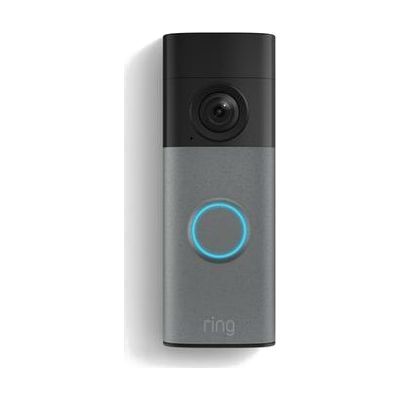
Battery Doorbell (2nd Gen) — Doorbell Camera
$99.99 ▲ $50.00 (100%)
Last verified July 28, 2026 · classified June 7, 2026
What it is
Summary
AI-generated from vendor-published content · June 7, 2026
The Ring Battery Doorbell (2nd Gen) is a wireless video doorbell that sends real-time alerts, live video, and two-way audio to a smartphone whenever someone presses the bell or motion is detected near the front door. For someone who is deaf or hard of hearing, this fills a genuine gap: traditional doorbells are purely auditory, and this camera-based system delivers visual notifications and a live camera feed regardless of whether you can hear the chime. The device runs on a built-in rechargeable battery, so no wiring is required for basic installation. The camera captures 2K video with zoom, which also benefits low-vision users who want a closer look at visitors before opening the door. Full functionality depends on a smartphone with the Ring app and, for video history beyond a live snapshot, an ongoing Ring Protect subscription — that recurring cost is easy to overlook at purchase.
Quick Facts Catalog facts · auto-generated
- AT Act lending
- Out of pocket
What Setup Looks Like
- Out of the box
Download the Ring app and create an account to begin setup. - With a guide
- Mount the provided bracket to a flat surface near the door using included screws and a screwdriver.
- Snap the doorbell onto the bracket and follow the in-app pairing steps to connect it to your home Wi-Fi.
- Configure motion zones, alert preferences, and chime notifications in the app — full setup typically takes 20–30 minutes.
- See Ring's setup guide in the Ring app or ring.com for detailed instructions.
Getting it
Try Before You Buy
Devices like this are often available to borrow through your state's AT Act program — typically free or low-cost — so you can try it before buying or pursuing funding.
Where to Get It
This is the vendor WhatCanHelp tracks for this product — it may also be available from other retailers or a local supplier, and prices vary.
Some links may be affiliate links — WhatCanHelp may earn a small commission from purchases at no extra cost to you. More on affiliates →
As an Amazon Associate we earn from qualifying purchases.
Wondering how equipment like this gets paid for? See the official funding programs in your state.
Compare & explore
Sources & fine print
Vendor facts (name, price, platforms, vendor link) sourced from Ring (Amazon) — view on vendor site; last verified July 28, 2026.
Classification & description AI-generated from vendor-published content on June 7, 2026 · confidence: high. Vendor specs may lag; verify before relying on details in a clinical or funding artifact.