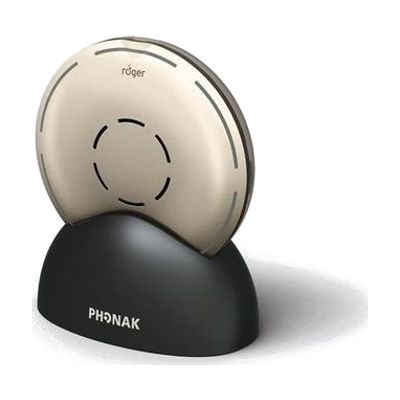
Phonak Roger Select 3 Microphone | RogerDirect Compatible
by Phonak
Price is what the vendor listed when last checked. Confirm it with the vendor before buying.
Last verified September 16, 2026 · classified July 7, 2026
What it is
Summary
AI-generated from vendor-published content · July 7, 2026
The Roger Select 3 is a wireless tabletop and wearable microphone designed for hearing aid users who struggle to follow conversations in noisy group settings — dinner tables, work meetings, family gatherings. It uses an array of six directional beams to automatically detect and amplify whoever is speaking, rotating focus as talkers change, without requiring the listener to do anything. It streams directly to compatible Phonak hearing aids via RogerDirect (no separate receiver needed for those models), and also works with Roger X receivers for other hearing aids. The $1,265 price reflects clinical-grade performance, but it only solves the listening-in-noise problem — it doesn't replace hearing aids, and hearing aid wearers whose devices lack RogerDirect will need a Roger X receiver as an additional purchase.
Quick Facts Catalog facts · auto-generated
- AT Act lending
- Insurance
- Out of pocket
- School district
- Vocational rehab
What Setup Looks Like
- Out of the box
If your hearing aids have RogerDirect built in, place the Select 3 on the table — it begins transmitting automatically when powered on. - With a guide
- Pair the Select 3 to your hearing aids or Roger receivers following the pairing procedure in the Phonak app or manual.
- Set up the docking station for multimedia streaming from TV or computer.
- Practice switching between table mode, manual selection mode, and clip-on lapel mode — allow 20-30 minutes to get comfortable with each mode.
- With professional help
- An audiologist confirms your hearing aids support RogerDirect or fits the correct Roger X receiver for your specific hearing aid model.
- The audiologist adjusts Roger program settings within your hearing aid fitting software to optimize speech-in-noise performance — typically completed in one appointment.
- See manufacturer support resources for detailed instructions.
Getting it
Try Before You Buy
Devices like this are often available to borrow through your state's AT Act program — typically free or low-cost — so you can try it before buying or pursuing funding.
Where to Get It
This is the vendor WhatCanHelp tracks for this product — it may also be available from other retailers or a local supplier, and prices vary.
Some links may be affiliate links — WhatCanHelp may earn a small commission from purchases at no extra cost to you. More on affiliates →
As an Amazon Associate we earn from qualifying purchases.
How to Fund This
Equipment like this is often pursued through official state programs. These are common starting points — each program decides its own eligibility and what it covers, so the first step is always a phone call.
Compare & explore
Sources & fine print
Vendor facts (name, price, platforms, vendor link) sourced from Phonak — view on vendor site; last verified September 16, 2026.
Classification & description AI-generated from vendor-published content on July 7, 2026 · confidence: high. Vendor specs may lag; verify before relying on details in a clinical or funding artifact.