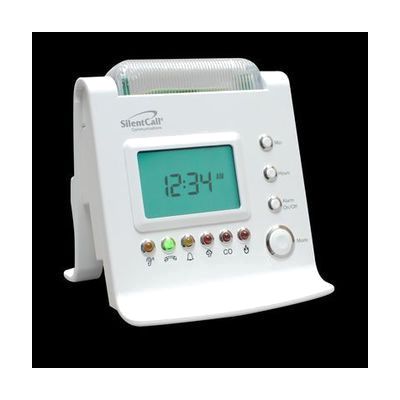
Signature Series Sidekick II™ 418 MHz Receiver with Strobe Light (SK2-SS)
Price is what the vendor listed when last checked. Confirm it with the vendor before buying.
Last verified September 16, 2026 · classified April 26, 2026
What it is
Summary
AI-generated from vendor-published content · April 26, 2026
The Sidekick II is a bedside or desktop receiver that translates incoming wireless signals from throughout your home into visible flashing strobe light alerts, using six different colored lights and icons to distinguish between specific events like doorbell rings, phone calls, fire alarms, carbon monoxide warnings, and weather alerts. It's designed for people who are deaf or hard of hearing and need a visual or tactile substitute for the auditory cues most alerting systems rely on. The unit is a complete standalone receiver — it plugs into a standard outlet, includes a backup battery, connects to a phone line, and has a built-in alarm clock, though it requires compatible Silent Call Signature Series 418 MHz transmitters (sold separately) to actually detect events around your home. This is a receiver only, so the total cost of a full home alerting setup depends on how many transmitters you need for each location or hazard you want to cover.
Quick Facts Catalog facts · auto-generated
- AT Act lending
- Medicaid waiver
- Out of pocket
- Vocational rehab
What Setup Looks Like
- Out of the box
- Plug the unit into a standard 110V outlet and confirm the digital clock display is active.
- Connect the included telephone cable to a phone line jack if phone-call alerting is needed.
- With a guide
- Pair each Signature Series 418 MHz transmitter (doorbell, smoke detector, sound monitor, etc.) to the receiver following the pairing instructions in the product manual.
- Test each transmitter location to confirm the correct colored light and icon appears on the receiver — allow 30–60 minutes for a full home setup. See manufacturer support resources for detailed instructions.
Getting it
Try Before You Buy
Devices like this are often available to borrow through your state's AT Act program — typically free or low-cost — so you can try it before buying or pursuing funding.
Where to Get It
This is the vendor WhatCanHelp tracks for this product — it may also be available from other retailers or a local supplier, and prices vary.
Some links may be affiliate links — WhatCanHelp may earn a small commission from purchases at no extra cost to you. More on affiliates →
As an Amazon Associate we earn from qualifying purchases.
How to Fund This
Equipment like this is often pursued through official state programs. These are common starting points — each program decides its own eligibility and what it covers, so the first step is always a phone call.
Compare & explore
Sources & fine print
Vendor facts (name, price, platforms, vendor link) sourced from Silent Call Communications — view on vendor site; last verified September 16, 2026.
Classification & description AI-generated from vendor-published content on April 26, 2026 · confidence: high. Vendor specs may lag; verify before relying on details in a clinical or funding artifact.