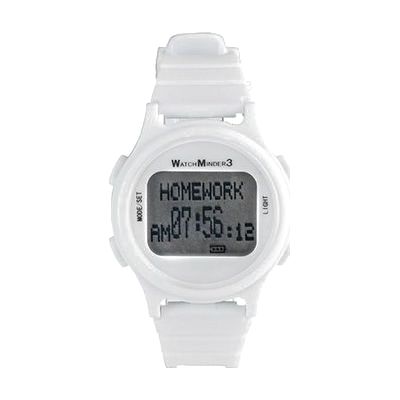
The WatchMinder 3- Vibrating Reminder Watch-White
by HearMore
Price is what the vendor listed when last checked. Confirm it with the vendor before buying.
What it is
Summary
AI-generated from vendor-published content · October 1, 2026
The WatchMinder 3 looks like an everyday sports watch, but it gives silent vibration alerts and shows short text prompts like MEDS, RELAX, or PAY ATTN up to 30 times a day. You pick from 65 preset messages, so it can cue things like taking medication, starting homework or chores, or staying on track with a diet, exercise, or behavior plan. It has a reminder mode for specific tasks and a training mode for self-monitoring, and both can run at once. The watch is sized to fit children, teens, and adults with smaller wrists, and the alerts are discreet enough to use in class or at work.
Getting it
Try before you buy
Devices like this are often available to borrow through your state's AT Act program — typically free or low-cost — so you can try it before buying or pursuing funding.
Where to get it
This is the vendor WhatCanHelp tracks for this product — it may also be available from other retailers or a local supplier, and prices vary.
How to fund this
These are common places to ask about paying for equipment like this. Each one decides its own eligibility and what it covers, so start by asking them.
Details
Quick Facts Catalog facts · auto-generated
- Platform
- Age range
- Complexity
- Setup with instructions
- Price
- $89.95
- Funding
- AT Act lending
- Out of pocket
- School district
- Vocational rehab
What setup looks like
- Out of the box
Put the watch on and check that the time is set. It works as a normal watch right away. - With a guide
- Follow the manual to choose which of the 65 preset messages you want and set the times they should appear.
- Decide whether you want reminder mode, training mode, or both running together, and set each one up.
- Do a test day to confirm the alerts feel noticeable but not distracting. Plan on about 30 minutes for the first setup.
Compare & explore
Sources & fine print
Vendor facts (name, price, platforms, vendor link) sourced from MaxiAids — view on vendor site (opens in a new tab); last checked November 2, 2026.
Classification & description AI-generated from vendor-published content on October 1, 2026 · confidence: high. Vendor specs may lag; verify before relying on details in a clinical or funding artifact.