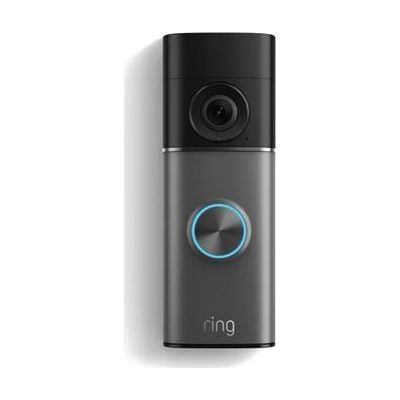
Battery Doorbell Pro (2nd Gen) – Doorbell Camera
$249.99, see price history Price rose $50.00 since October 26, 2026
Price is what the vendor listed when last checked. Confirm it with the vendor before buying.
What it is
Summary
AI-generated from vendor-published content · October 1, 2026
The Ring Battery Doorbell Pro (2nd Gen) is a battery-powered video doorbell that sends alerts to your phone when someone rings or is detected at the door. You can see the visitor in live video, with up to 10x enhanced zoom, and talk with them through two-way audio, so you don't have to get to the door. That can help someone who can't hear a chime or who has trouble getting to the entrance quickly. It has night vision for dark conditions and a quick-release battery pack. You mount it with the included bracket and hardware, then set it up and adjust settings in the Ring app. Some Ring features may need a paid subscription, so check what's included before you buy.
Getting it
Try before you buy
Devices like this are often available to borrow through your state's AT Act program — typically free or low-cost — so you can try it before buying or pursuing funding.
Where to get it
This is the vendor WhatCanHelp tracks for this product — it may also be available from other retailers or a local supplier, and prices vary.
Wondering how equipment like this gets paid for? See the official funding programs in your state.
Details
Quick Facts Catalog facts · auto-generated
- Type
- Addresses
- Age range
- Complexity
- Setup with instructions
- Price
- $249.99
- Funding
- AT Act lending
- Out of pocket
What setup looks like
- With a guide
- Charge the battery pack, then fit it into the doorbell with the quick-release design.
- Screw the mounting bracket to the wall or door frame using the included hardware, and attach the doorbell.
- Install the Ring app on your phone and follow the in-app steps to connect the doorbell to your Wi-Fi and set up alerts. Plan on about 30 minutes.
Compare & explore
Sources & fine print
Vendor facts (name, price, platforms, vendor link) sourced from Ring (Amazon) — view on vendor site (opens in a new tab); last checked October 31, 2026.
Classification & description AI-generated from vendor-published content on October 1, 2026 · confidence: high. Vendor specs may lag; verify before relying on details in a clinical or funding artifact.