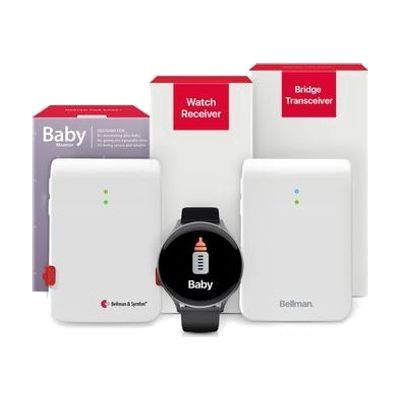
Baby Monitor System with Bluetooth Bridge and Watch Receiver
Last verified June 16, 2026 · classified April 26, 2026
What it is
Summary
AI-generated from vendor-published content · April 26, 2026
This system converts doorbell sounds into wrist vibrations and visual icons on a watch receiver, so someone who is deaf or hard of hearing always knows when someone is at the door. It's designed for anyone who misses doorbells, intercoms, or other household chimes due to hearing loss — whether mild or profound. The bundle includes the door transmitter, a Bluetooth bridge, and a wristwatch receiver, making it a complete out-of-the-box solution; you can also extend alerts to a smartphone via the free Bellman Assistant app. The door transmitter works by listening for your existing doorbell chime sound, so unusual or very quiet chimes may need a brief 'teaching' step to ensure reliable detection.
Quick Facts Catalog facts · auto-generated
- AT Act lending
- Medicaid waiver
- Out of pocket
What Setup Looks Like
- Out of the box
- Place the door transmitter next to your existing doorbell chime.
- Pair the watch receiver to the Bluetooth bridge following the quick pairing step in the guide.
- Test by ringing the doorbell — watch should vibrate and display the alert icon within seconds.
- With a guide
- If your chime is non-standard (intercom buzzer, medical equipment), follow the sound-teaching procedure in the manual to train the transmitter.
- Download the free Bellman Assistant app on iOS or Android to enable smartphone notifications as a secondary alert. Expect 15–20 minutes total setup. See manufacturer support resources for detailed instructions.
Getting it
Try Before You Buy
Devices like this are often available to borrow through your state's AT Act program — typically free or low-cost — so you can try it before buying or pursuing funding.
Where to Get It
Some links may be affiliate links — WhatCanHelp may earn a small commission from purchases at no extra cost to you. More on affiliates →
As an Amazon Associate we earn from qualifying purchases.
How to Fund This
Equipment like this is often pursued through official state programs. These are common starting points — each program decides its own eligibility and what it covers, so the first step is always a phone call.
Compare & explore
Sources & fine print
Vendor facts (name, price, platforms, vendor link) sourced from Bellman & Symfon — view on vendor site; last verified June 16, 2026.
Classification & description AI-generated from vendor-published content on April 26, 2026 · confidence: high. Vendor specs may lag; verify before relying on details in a clinical or funding artifact.