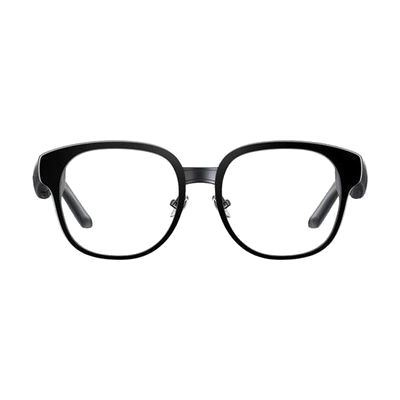
Captify Myvu Smart Glasses | Real-Time Captions & Translations
by Captify
Last verified July 28, 2026 · classified July 23, 2026
What it is
Summary
AI-generated from vendor-published content · July 23, 2026
These smart glasses project real-time speech-to-text captions directly into the wearer's line of sight through a binocular display built into the lenses — so instead of glancing down at a phone screen, someone who is deaf or hard of hearing can watch captions while maintaining eye contact with the person speaking. Dual directional microphones with noise cancellation focus on whoever is in front of you, making them practical for one-on-one conversations at appointments, at work, or in social settings. At 43 grams and with one-touch controls, the glasses are designed for all-day wear without being fussy to operate. The frame accepts prescription inserts (single-vision, reading, or progressive), but that's an added cost and step — what you're buying here is the nonprescription base frame, and you'll need to factor in lens customization if you require correction. Real-time translation across 13 languages is included free, which sets this apart from some competitors, though caption accuracy will depend on speech clarity and ambient noise like any speech-recognition system.
Quick Facts Catalog facts · auto-generated
- AT Act lending
- Out of pocket
- Vocational rehab
What Setup Looks Like
- Out of the box
Put on the glasses and use the one-touch control to activate captions — basic captioning can begin quickly once connected. - With a guide
- Download the companion app and pair the glasses via Bluetooth or Wi-Fi.
- Configure language preferences and translation settings in the app.
- If prescription lenses are needed, arrange fitting through an optician separately — allow 1-2 weeks for that process.
- Review the Captify setup guide to optimize microphone positioning and caption display settings (approximately 30-60 minutes total for initial setup). See manufacturer support resources for detailed instructions.
Getting it
Try Before You Buy
Devices like this are often available to borrow through your state's AT Act program — typically free or low-cost — so you can try it before buying or pursuing funding.
Where to Get It
This is the vendor WhatCanHelp tracks for this product — it may also be available from other retailers or a local supplier, and prices vary.
Some links may be affiliate links — WhatCanHelp may earn a small commission from purchases at no extra cost to you. More on affiliates →
As an Amazon Associate we earn from qualifying purchases.
How to Fund This
Equipment like this is often pursued through official state programs. These are common starting points — each program decides its own eligibility and what it covers, so the first step is always a phone call.
Compare & explore
Sources & fine print
Vendor facts (name, price, platforms, vendor link) sourced from Captify — view on vendor site; last verified July 28, 2026.
Classification & description AI-generated from vendor-published content on July 23, 2026 · confidence: high. Vendor specs may lag; verify before relying on details in a clinical or funding artifact.