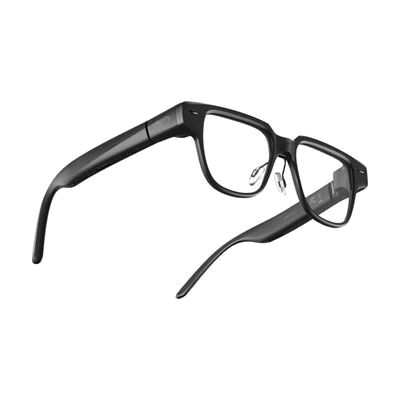
Captify Pro Smart Glasses
by Captify
Price is what the vendor listed when last checked. Confirm it with the vendor before buying.
What it is
Summary
AI-generated from vendor-published content · October 1, 2026
The Captify Pro looks like regular eyewear, but it shows live captions of what people around you are saying right on the lenses. Text appears in both eyes at once, centered in your view, so you can read along without looking away from the person talking or giving up lip reading. Two directional microphones are built to pick up speech in noisy places like restaurants, meetings, and family gatherings, up to about 2.5 meters away. The glasses also alert you to more than 300 non-speech sounds and can translate between languages. At 37 grams, they are light enough for all-day wear, and the nose bridge adjusts three ways. The version listed here comes with nonprescription lenses, so anyone who needs vision correction should check how to get their prescription fitted.
Getting it
Try before you buy
Devices like this are often available to borrow through your state's AT Act program — typically free or low-cost — so you can try it before buying or pursuing funding.
Where to get it
This is the vendor WhatCanHelp tracks for this product — it may also be available from other retailers or a local supplier, and prices vary.
How to fund this
These are common places to ask about paying for equipment like this. Each one decides its own eligibility and what it covers, so start by asking them.
Details
Quick Facts Catalog facts · auto-generated
- Addresses
- Platform
- Complexity
- Setup with instructions
- Price
- $699.00
- Funding
- AT Act lending
- Insurance
- Out of pocket
- Vocational rehab
What setup looks like
- With a guide
- Charge the glasses, then turn them on and adjust the 3-way nose bridge until they sit comfortably and the text looks centered.
- Follow the manufacturer's setup steps to connect any companion app and choose your caption and translation language settings, if the glasses use one.
- Try them in a quiet room first, then in a noisier place, and adjust until captions are easy to read. Plan on about 30 minutes.
Compare & explore
Sources & fine print
Vendor facts (name, price, platforms, vendor link) sourced from Diglo — view on vendor site (opens in a new tab); last checked October 31, 2026.
Classification & description AI-generated from vendor-published content on October 1, 2026 · confidence: medium. Vendor specs may lag; verify before relying on details in a clinical or funding artifact.