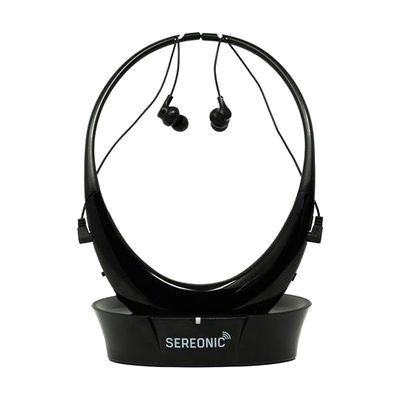
Sereonic TV-EB200 TV Listening System
Price is what the vendor listed when last checked. Confirm it with the vendor before buying.
What it is
Summary
AI-generated from vendor-published content · October 1, 2026
The Sereonic TV-EB200 sends your TV's sound to a pair of wireless headphones, so you can set your own volume without turning up the TV for everyone else. The transmitter base connects to the TV through a 3.5mm AUX, RCA, or optical audio cable, and the headphones work up to about 100 feet away. Three tone settings boost low, mid, or high sounds, which can make dialogue easier to pick out. The headphones run on replaceable rechargeable AAA batteries (up to about 8 hours) and charge by resting on the base. This is a good fit for someone who has trouble hearing TV speech at a comfortable volume. It's a headphone system, not a hearing aid.
Getting it
Try before you buy
Devices like this are often available to borrow through your state's AT Act program — typically free or low-cost — so you can try it before buying or pursuing funding.
Where to get it
This is the vendor WhatCanHelp tracks for this product — it may also be available from other retailers or a local supplier, and prices vary.
Wondering how equipment like this gets paid for? See the official funding programs in your state.
Details
Quick Facts Catalog facts · auto-generated
- Addresses
- Platform
- Complexity
- Setup with instructions
- Price
- $119.95
- Funding
- AT Act lending
- Out of pocket
What setup looks like
- With a guide
- Find an audio output on your TV: 3.5mm AUX, RCA, or optical. Plug the matching cable from the TV into the transmitter base.
- Plug in the base and put the rechargeable AAA batteries in the headphones. Rest the headphones on the base to charge them.
- Turn on the headphones, set the volume, and try the three tone settings while a show is playing. Plan on about 15-30 minutes, mostly to match the right cable to your TV.
Compare & explore
Sources & fine print
Vendor facts (name, price, platforms, vendor link) sourced from Diglo — view on vendor site (opens in a new tab); last checked October 31, 2026.
Classification & description AI-generated from vendor-published content on October 1, 2026 · confidence: high. Vendor specs may lag; verify before relying on details in a clinical or funding artifact.