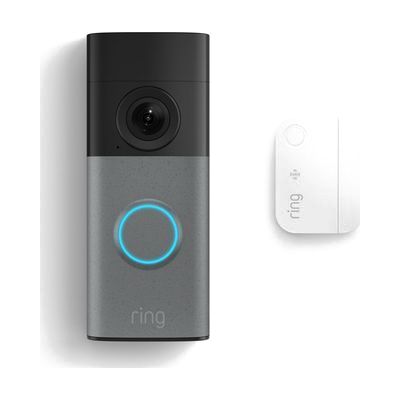
Wired Doorbell & Window Door Sensor Bundle
Price is what the vendor listed when last checked. Confirm it with the vendor before buying.
What it is
Summary
AI-generated from vendor-published content · October 1, 2026
This bundle pairs a wired video doorbell with a window and door sensor, so you get alerts about visitors and about doors or windows opening. The doorbell has a 2K camera and a wide view of the walkway, and it connects to Wi-Fi (2.4GHz) so you can see and respond from your phone. The doorbell runs on your home's existing doorbell wiring and transformer, which means it needs a wired install. The sensor runs on two included coin cell batteries, and its pairing needs an Amazon Sidewalk or Z-Wave connection. It may suit someone who can't hear a standard chime or can't get to the door quickly, since the alerts come to a device and you don't need to be near the door. Plan on a short setup session with the guide, and a few more steps if you need to add a base station or gateway.
Getting it
Try before you buy
Devices like this are often available to borrow through your state's AT Act program — typically free or low-cost — so you can try it before buying or pursuing funding.
Where to get it
This is the vendor WhatCanHelp tracks for this product — it may also be available from other retailers or a local supplier, and prices vary.
Wondering how equipment like this gets paid for? See the official funding programs in your state.
Details
Quick Facts Catalog facts · auto-generated
- Type
- Addresses
- Platform
- Age range
- Complexity
- Setup with instructions
- Price
- $54.99
- Funding
- AT Act lending
- Out of pocket
What setup looks like
- With a guide
- Turn off power to your doorbell, remove the old button, and mount the new doorbell on the existing wiring using the included plate and hardware.
- Download the Ring app, connect the doorbell to your 2.4GHz Wi-Fi, and turn on phone alerts.
- Peel the battery tab on the sensor, attach it to the door or window, and pair it through the app (it needs an Amazon Sidewalk gateway or a Z-Wave base station). Plan on 30-60 minutes in all.
Compare & explore
Sources & fine print
Vendor facts (name, price, platforms, vendor link) sourced from Ring (Amazon) — view on vendor site (opens in a new tab); last checked October 31, 2026.
Classification & description AI-generated from vendor-published content on October 1, 2026 · confidence: medium. Vendor specs may lag; verify before relying on details in a clinical or funding artifact.