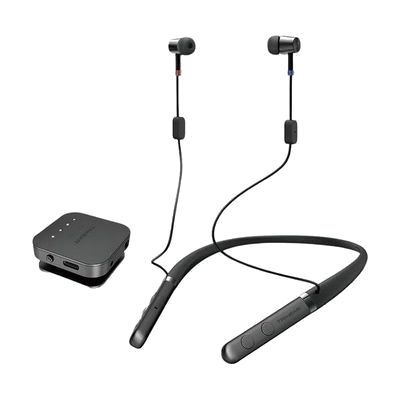
Trihear Neco
by Trihear
Price is what the vendor listed when last checked. Confirm it with the vendor before buying.
What it is
Summary
AI-generated from vendor-published content · October 16, 2026
The Trihear Neco is a personal sound amplifier that rests on a soft silicone neckband, with small open ear domes that sit outside the ear canal. It comes with a remote microphone you can place near a speaker, so you hear the voice you want over background noise, and that same microphone can also stream TV sound. You can set volume, tone, and left-right balance, and it uses voice enhancement and noise reduction to help voices stand out in busy rooms. It's an amplifier for people who want help hearing conversation or TV, not a fitted hearing aid, and the source doesn't say it's programmed to a hearing test.
Getting it
Try before you buy
Devices like this are often available to borrow through your state's AT Act program — typically free or low-cost — so you can try it before buying or pursuing funding.
Where to get it
This is the vendor WhatCanHelp tracks for this product — it may also be available from other retailers or a local supplier, and prices vary.
Wondering how equipment like this gets paid for? See the official funding programs in your state.
Details
Quick Facts Catalog facts · auto-generated
- Addresses
- Platform
- Complexity
- Setup with instructions
- Price
- $189.00
- Funding
- AT Act lending
- Out of pocket
What setup looks like
- With a guide
- Charge the neckband and remote microphone, then turn them on. They pair with each other automatically.
- Wear the neckband, then use the volume, tone, and balance controls to find a comfortable sound for each ear.
- To use it with a TV, connect the remote microphone directly to the television for the best sound, or set it near the TV speaker. Plan on about 30 minutes to get settings and placement comfortable.
Compare & explore
Sources & fine print
Vendor facts (name, price, platforms, vendor link) sourced from Diglo — view on vendor site (opens in a new tab); last checked October 31, 2026.
Classification & description AI-generated from vendor-published content on October 16, 2026 · confidence: high. Vendor specs may lag; verify before relying on details in a clinical or funding artifact.