CaptionPad
by CaptionPad
Price is what the vendor listed when last checked. Confirm it with the vendor before buying.
What it is
Summary
AI-generated from vendor-published content · September 24, 2026
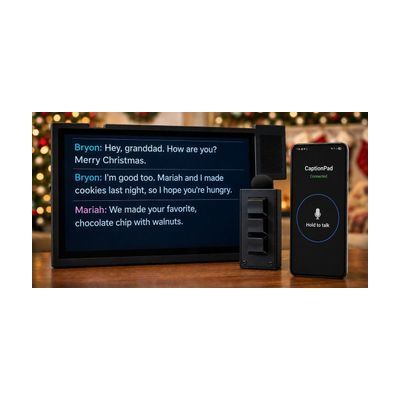
The CaptionPad is a single-purpose tablet that displays real-time captions of speech for someone with hearing loss — the speaker talks into a wireless push-to-talk microphone, and the captions appear on an 8-inch screen with labels identifying who said what. It's designed specifically for older adults who find smartphones or tablet apps too complicated: there's one button on the device, no app store, no notifications, no menus to navigate. It works without an internet connection, so it can be used anywhere Wi-Fi is unreliable. Family members can use a companion app on their own phones to serve as additional microphones or to adjust settings on the user's behalf — but the person with hearing loss doesn't need to touch any of that. Captions run only while the microphone button is held, so the speaking partner needs to remember to press it while talking.
Getting it
Try before you buy
Devices like this are often available to borrow through your state's AT Act program — typically free or low-cost — so you can try it before buying or pursuing funding.
Where to get it
This is the vendor WhatCanHelp tracks for this product — it may also be available from other retailers or a local supplier, and prices vary.
Wondering how equipment like this gets paid for? See the official funding programs in your state.
Details
Quick Facts Catalog facts · auto-generated
- Addresses
- Platform
- Age range
- Complexity
- Ready to use
- Price
- $499.00
- Funding
- AT Act lending
- Out of pocket
What setup looks like
- Out of the box
Turn on the CaptionPad with the single power button — captions appear as soon as the speaker presses the wireless microphone button. - With a guide
- Charge the tablet and wireless microphone before first use.
- A family member or caregiver downloads the companion app to manage settings and optionally serve as an additional microphone.
- Initial pairing of the microphone to the tablet takes about 10–15 minutes following the quick-start guide.
Compare & explore
Sources & fine print
Vendor facts (name, price, platforms, vendor link) sourced from CaptionPad — view on vendor site (opens in a new tab); last checked October 31, 2026.
Classification & description AI-generated from vendor-published content on September 24, 2026 · confidence: high. Vendor specs may lag; verify before relying on details in a clinical or funding artifact.