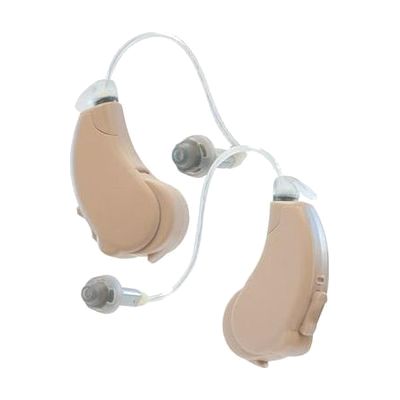
Lucid Hearing Engage Rechargeable Bluetooth OTC Hearing Aids (Android)
$799.99 ▲ $200.00 (33%)
Last verified June 16, 2026 · classified April 26, 2026
What it is
Summary
AI-generated from vendor-published content · April 26, 2026
These are over-the-counter (OTC) rechargeable hearing aids designed for adults who notice they're struggling to hear conversations or TV but haven't yet been formally diagnosed with significant hearing loss. They use a receiver-in-the-ear (RITE) style — a small unit sits behind the ear with a thin wire leading to a speaker tip inside the ear canal — and stream audio directly from an Android phone via Bluetooth for calls and media. The companion Android app lets you adjust volume, bass/treble, left/right balance, and switch between four preset sound profiles without visiting a clinic. This is a complete, ready-to-use pair that comes with a portable charging case, but keep in mind they're Android-specific — iOS users need a different model — and because there's no audiologist fitting, people with more than mild-to-moderate hearing loss may find the preset profiles insufficient for their actual needs.
Quick Facts Catalog facts · auto-generated
- AT Act lending
- Out of pocket
What Setup Looks Like
- Out of the box
- Open the charging case and remove both hearing aids — they power on automatically.
- Place the receiver tips in your ears and the main units over your ears.
- With a guide
- Download the free Lucid Hearing app from the Google Play Store on your Android device.
- Follow the in-app Bluetooth pairing instructions to connect the hearing aids.
- Use the app to select a sound profile (Mild, Moderate, Bass Boost, or Max) and fine-tune volume and bass/treble balance to your preference — expect 15-30 minutes to find comfortable settings. See manufacturer support resources for detailed instructions.
Getting it
Try Before You Buy
Devices like this are often available to borrow through your state's AT Act program — typically free or low-cost — so you can try it before buying or pursuing funding.
Where to Get It
Some links may be affiliate links — WhatCanHelp may earn a small commission from purchases at no extra cost to you. More on affiliates →
As an Amazon Associate we earn from qualifying purchases.
How to Fund This
Equipment like this is often pursued through official state programs. These are common starting points — each program decides its own eligibility and what it covers, so the first step is always a phone call.
Compare & explore
Sources & fine print
Vendor facts (name, price, platforms, vendor link) sourced from Lucid Hearing — view on vendor site; last verified June 16, 2026.
Classification & description AI-generated from vendor-published content on April 26, 2026 · confidence: high. Vendor specs may lag; verify before relying on details in a clinical or funding artifact.