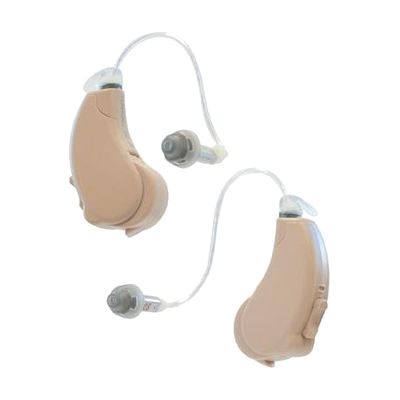
Lucid Hearing Engage Bluetooth OTC Hearing Aids (iOS)
Last verified June 16, 2026 · classified April 26, 2026
What it is
Summary
AI-generated from vendor-published content · April 26, 2026
These are over-the-counter (OTC) hearing aids designed for adults who notice mild-to-moderate hearing difficulty but haven't yet been fitted by an audiologist. They sit behind the ear with a small receiver that fits inside the ear canal (receiver-in-the-ear style), and they stream audio directly from an iPhone via Bluetooth — so phone calls, music, and media come through the aids rather than the phone speaker. You get a free iOS app to adjust volume, tone, and balance between ears, and four preset sound profiles let you dial in settings for different listening environments. This is a complete, ready-to-use pair right out of the box — batteries, ear tips, and a cleaning tool are all included — but because OTC aids are self-fitted without a hearing test, people with more complex or asymmetric hearing loss may find the preset profiles insufficient, and audiologist-fitted prescription aids would serve them better.
Quick Facts Catalog facts · auto-generated
- AT Act lending
- Out of pocket
What Setup Looks Like
- Out of the box
- Insert size 13 batteries (included) into each hearing aid.
- Select ear tips that fit comfortably and insert the aids.
- Power on and try one of the four built-in sound profiles immediately — no app required for basic use.
- With a guide
- Download the free Lucid Hearing app from the iOS App Store.
- Pair each hearing aid to your iPhone via Bluetooth following the in-app prompts.
- Use the app to fine-tune volume, bass/mid/treble, and left/right balance for your specific hearing pattern.
- Allow 1–2 weeks of daily wear to adjust to amplified sound before making final settings decisions. See manufacturer support resources for detailed instructions.
Getting it
Try Before You Buy
Devices like this are often available to borrow through your state's AT Act program — typically free or low-cost — so you can try it before buying or pursuing funding.
Where to Get It
Some links may be affiliate links — WhatCanHelp may earn a small commission from purchases at no extra cost to you. More on affiliates →
As an Amazon Associate we earn from qualifying purchases.
How to Fund This
Equipment like this is often pursued through official state programs. These are common starting points — each program decides its own eligibility and what it covers, so the first step is always a phone call.
Compare & explore
Sources & fine print
Vendor facts (name, price, platforms, vendor link) sourced from Lucid Hearing — view on vendor site; last verified June 16, 2026.
Classification & description AI-generated from vendor-published content on April 26, 2026 · confidence: high. Vendor specs may lag; verify before relying on details in a clinical or funding artifact.