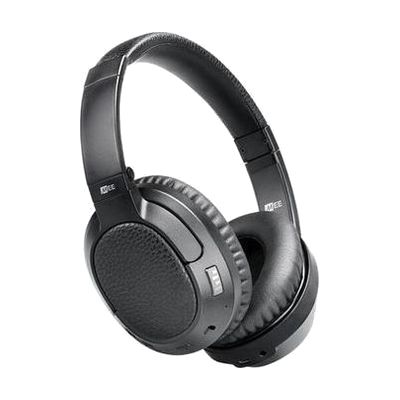
Matrix Cinema wireless Bluetooth headphone with audio enhancement
by MEE Audio
$149.99 ▲ $30.00 (25%)
Price is what the vendor listed when last checked. Confirm it with the vendor before buying.
Last verified September 16, 2026 · classified April 26, 2026
What it is
Summary
AI-generated from vendor-published content · April 26, 2026
These over-ear Bluetooth headphones include built-in audio processing modes specifically designed to make TV dialogue and movie speech easier to understand — not just louder, but clearer. They're a good fit for someone with mild-to-moderate hearing difficulty who struggles to follow spoken dialogue on TV without cranking the volume to levels that bother others in the room. You get a complete, ready-to-use solution: the headphones connect via Bluetooth to a TV or streaming device, and you can switch between audio enhancement modes using onboard controls with no app required. These work best with Bluetooth-enabled TVs or a Bluetooth transmitter dongle (sold separately) — older TVs without Bluetooth will need an add-on adapter to use these wirelessly.
Quick Facts Catalog facts · auto-generated
- AT Act lending
- Out of pocket
What Setup Looks Like
- Out of the box
Put on headphones and power on — they're ready to use as standard Bluetooth headphones once paired. - With a guide
- Pair the headphones to your TV or Bluetooth transmitter using standard Bluetooth pairing mode.
- Cycle through the CinemaEAR audio enhancement modes using the onboard button to find the clarity setting that works best for you.
- If your TV lacks Bluetooth, purchase a compatible Bluetooth audio transmitter and connect it to the TV's audio output before pairing — expect 15–30 minutes total setup. See manufacturer support resources for detailed instructions.
Getting it
Try Before You Buy
Devices like this are often available to borrow through your state's AT Act program — typically free or low-cost — so you can try it before buying or pursuing funding.
Where to Get It
This is the vendor WhatCanHelp tracks for this product — it may also be available from other retailers or a local supplier, and prices vary.
Some links may be affiliate links — WhatCanHelp may earn a small commission from purchases at no extra cost to you. More on affiliates →
As an Amazon Associate we earn from qualifying purchases.
Wondering how equipment like this gets paid for? See the official funding programs in your state.
Compare & explore
Sources & fine print
Vendor facts (name, price, platforms, vendor link) sourced from MEE Audio — view on vendor site; last verified September 16, 2026.
Classification & description AI-generated from vendor-published content on April 26, 2026 · confidence: high. Vendor specs may lag; verify before relying on details in a clinical or funding artifact.