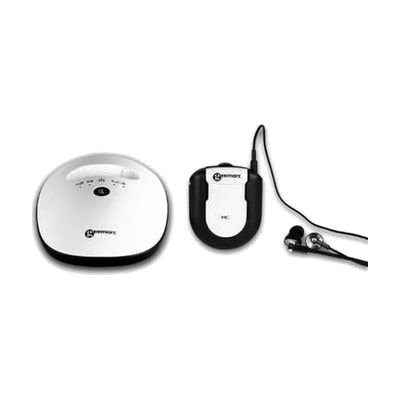
Geemarc 7350 Opticlip Amplified TV Listener
by Sonic Alert
Price is what the vendor listed when last checked. Confirm it with the vendor before buying.
What it is
Summary
AI-generated from vendor-published content · October 27, 2026
The Opticlip is a wireless TV listener: a transmitter connects to your TV, and a rechargeable receiver sends the sound straight to your ears through the included earbuds or any headset with a 3.5mm plug. You can set the tone and the volume for each ear on its own, and the sound reaches up to 82 feet away, even through walls and ceilings. A mic button on the receiver lets you hear the people around you without taking the earbuds out. It's a good fit for someone who needs the TV louder than the rest of the room can stand, or who wants to hear dialogue more clearly. Your TV needs an optical audio output, and the receiver gives about 6 hours per charge.
Getting it
Try before you buy
Devices like this are often available to borrow through your state's AT Act program — typically free or low-cost — so you can try it before buying or pursuing funding.
Where to get it
This is the vendor WhatCanHelp tracks for this product — it may also be available from other retailers or a local supplier, and prices vary.
Wondering how equipment like this gets paid for? See the official funding programs in your state.
Details
Quick Facts Catalog facts · auto-generated
- Addresses
- Platform
- Complexity
- Setup with instructions
- Price
- $109.18
- Funding
- AT Act lending
- Out of pocket
What setup looks like
- Out of the box
- Place the transmitter near your TV and plug in its power.
- Charge the receiver for about 3 hours before first use.
- With a guide
- Run an optical cable from your TV's optical audio output to the transmitter's optical jack.
- Plug in the earbuds or your own headset, then switch on the receiver and pick one of the 2 channels.
- Adjust the volume, tone and left/right balance until speech sounds clear. Expect about 15-30 minutes in all, and check your TV's audio settings if no sound comes through.
Compare & explore
Sources & fine print
Vendor facts (name, price, platforms, vendor link) sourced from Diglo — view on vendor site (opens in a new tab); last checked October 26, 2026.
Classification & description AI-generated from vendor-published content on October 27, 2026 · confidence: high. Vendor specs may lag; verify before relying on details in a clinical or funding artifact.