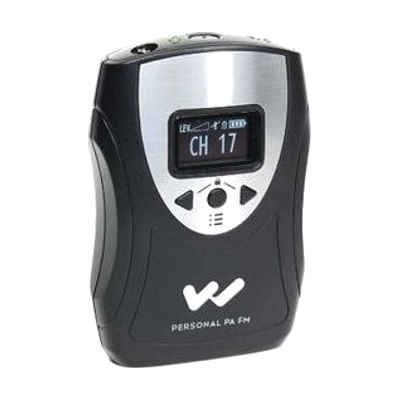
Williams Sound Personal PA T46 Body Pack Transmitter
Last verified July 28, 2026 · classified April 26, 2026
What it is
Summary
AI-generated from vendor-published content · April 26, 2026
The Personal PA T46 is a belt-worn FM radio transmitter that broadcasts a speaker's voice wirelessly to listeners using compatible receivers, earphones, or neckloops — covering up to 150 feet. It's designed for situations where one person needs to be clearly heard by others with hearing loss, such as a tour guide speaking to a group, a teacher addressing students with hearing aids, or a presenter in a meeting room. This is the transmitter only — it requires separately purchased Williams Sound receivers (like the R37 or R35-8) to complete the listening system, and you'll need to match the frequency channel settings on both devices. With 17 selectable channels, 30-hour battery life on AAs, and a mute button, it's a practical workaround for environments where a traditional PA system isn't available or practical.
Quick Facts Catalog facts · auto-generated
- AT Act lending
- Medicaid waiver
- Out of pocket
- School district
- Vocational rehab
What Setup Looks Like
- Out of the box
- Insert 2 AA batteries and clip the transmitter to a belt or pocket.
- Plug a compatible 3.5mm electret microphone into the mic input.
- Power on and select a channel using the OLED menu controls.
- With a guide
- Match the transmitter channel to each listener's receiver — consult the Williams Sound setup guide for channel pairing steps.
- Adjust mic gain and compression mode for the speaking environment (indoor room vs. noisy outdoor setting).
- Test range and audio quality with listeners before the session — allow 15-30 minutes for initial configuration. See manufacturer support resources for detailed instructions.
- With professional help
- An audiologist or assistive listening system installer can assess venue acoustics, recommend appropriate microphone type, and ensure the system meets ADA compliance requirements for assistive listening coverage.
- For institutional deployment (schools, houses of worship, healthcare), an ATP or AV integrator should configure multiple channels and verify no frequency interference — expect 1-2 hours of on-site setup.
Getting it
Try Before You Buy
Devices like this are often available to borrow through your state's AT Act program — typically free or low-cost — so you can try it before buying or pursuing funding.
Where to Get It
This is the vendor WhatCanHelp tracks for this product — it may also be available from other retailers or a local supplier, and prices vary.
Some links may be affiliate links — WhatCanHelp may earn a small commission from purchases at no extra cost to you. More on affiliates →
As an Amazon Associate we earn from qualifying purchases.
How to Fund This
Equipment like this is often pursued through official state programs. These are common starting points — each program decides its own eligibility and what it covers, so the first step is always a phone call.
Compare & explore
Sources & fine print
Vendor facts (name, price, platforms, vendor link) sourced from Williams Sound — view on vendor site; last verified July 28, 2026.
Classification & description AI-generated from vendor-published content on April 26, 2026 · confidence: high. Vendor specs may lag; verify before relying on details in a clinical or funding artifact.