Browse Assistive Technology
Products
-
GoTalk Everywhere
$50.00
GoTalk Everywhere is an AAC app, which means it gives someone a way to communicate through tapping buttons that speak or play recordings. It runs on iOS, Android, and the web, and it syncs communication pages across devices through the cloud. A therapist, teacher, or family member can build pages on the web and send them straight to the person who will use them. You get the basics: text-to-speech, voice recording, symbols, your own photos, and grid layouts from 1 up to 30 buttons per page. It's a good fit for someone who needs a simple, adjustable way to start communicating. The best results usually come from a speech-language pathologist helping choose the vocabulary and page layouts.
Verified 3 weeks agoProfessional guidance helps -

Orientation and Mobility for Wheelchair Users with Visual Impairment or Blindness
$4.99
This web-based publication teaches orientation and mobility (O&M) instructors how to train students who use wheelchairs and also have vision loss. It follows instructor Scott Crawford as he works with adult wheelchair users on skills like tight turns, going through doorways, trailing sidewalks and curbs, and using stairs and escalators. The focus is on how to size up an environment and solve mobility problems along the way. It is written for the instructor, not the traveler, so a family looking for direct help should bring it to their O&M specialist.
Verified 3 days agoProfessional guidance helps -

Cboard
Free
Cboard is a free AAC app that runs in a web browser. It lets someone communicate by tapping pictures, photos, or words on a board, and the app then speaks them aloud. Two symbol libraries are built in (Mulberry and ARASAAC), and you can build your own boards with your own symbols, photos, or text. It supports more than 40 languages and can be installed as an offline-capable web app, so it keeps working without an internet connection. Because it's software, you'll supply the phone, tablet, or computer yourself, and the boards will only be as useful as the vocabulary someone sets up in them.
Verified 4 days agoSetup with instructions -
Helperbird
Free plan · paid up to $35 every year
Helperbird is a browser extension that adds reading and writing supports to the websites and documents you already use. It can read text aloud, switch pages to dyslexia-friendly fonts like OpenDyslexic and Lexend, lay a color overlay over the screen, and show a reading ruler to keep your place on the line. For writing, it offers voice typing with word prediction, and a screenshot reader that can read text out of an image. It runs in Chrome, Firefox, Edge and Safari, on Chromebooks, on iPad and iPhone, and as add-ons for Google Docs, Slides and Sheets. The everyday tools are free, and a paid Pro plan adds more for individuals, so check which features you need before deciding.
Verified 4 days agoSetup with instructions -

Widgit Online
Yearly plan: ask the vendor
Widgit Online is a web-based tool for making materials that pair words with pictures (symbols). You can build visual timetables, communication books, flashcards, worksheets, social stories, supported reading materials, mind maps, and templates for AAC devices, either from hundreds of ready-made templates or from a blank page. It runs in a browser on a PC, Mac, or iPad, so there's nothing to install or update. It's a good fit for teachers, parents, and professionals supporting someone with communication needs, or someone building literacy skills. This is a subscription, and the activation code arrives by email after ordering. The vendor lists it for UK customers only, and an optional Dual Language Add-On translates materials into more than 80 languages.
Verified 4 days agoProfessional guidance helps -

UEB Math Tutorial
The UEB Math Tutorial is a free, web-based set of lessons and practice exercises that teaches how to write mathematics in Unified English Braille (UEB). It's built for both teachers and students, so a braille reader learning math notation and the educator supporting them can work through it side by side. You open it in a web browser, so there's nothing to buy or install.
Verified 3 days agoReady to use -

Nemeth Tutorial
The Nemeth Tutorial is a free, web-based course that teaches Nemeth braille code, the system used to write math in braille. It works through online lessons and practice exercises, so teachers and students can learn the code at their own pace in a browser. It suits a teacher who needs to learn Nemeth to support a braille-reading student, or a student learning to read and write math in braille. It teaches the code itself and is not a device, so you'll need your own way to practice or check braille.
Verified 3 days agoReady to use -

Kokolingo
Monthly plan: ask the vendor
Kokolingo is a web-based program for building speech skills in young learners through play. It is set up for a speech-language therapist or teacher, who buys one license and can then use it with as many learners as they like. Learner profiles can be created inside it. You use it in a browser, so there is nothing to install. The evidence here doesn't say which sounds or skills it covers, so check the vendor's details to see if it fits the learner's goals.
Verified 4 days agoProfessional guidance helps -

Braille Brain
Braille Brain is a free online tutorial that teaches the basics of Unified English Braille (UEB). You work through it at your own pace, typing braille with a 6-key entry method and checking your own practice along the way. It also includes assessments, so you can see how well the foundations are sticking. It runs in a web browser, which makes it a good fit for a sighted family member, teacher, or aide who wants to learn braille, as well as for anyone starting out on their own. The page doesn't say what hardware you need for the 6-key typing, so check that before you begin.
Verified 3 days agoReady to use -

Embossable Word Search
Embossable Word Search is a free website where teachers build their own braille word search puzzles and customize them for their students. It's a tool for the educator, not the student, so you'll also need a way to emboss (print in raised dots) what you create.
Verified 3 days agoProfessional guidance helps -
Typer Online
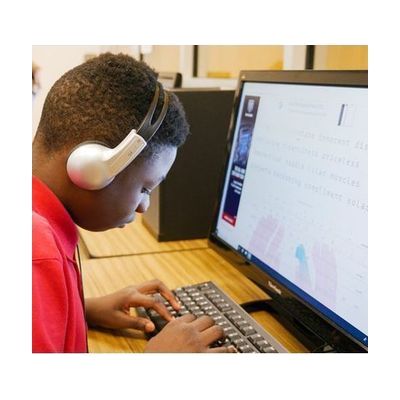
Typer Online is a browser-based program where students practice typing through drills, lessons, and a keyboard explorer. It's made by the American Printing House for the Blind and is meant for students learning to type, especially those with vision loss.
Verified 3 days agoSetup with instructions -
BeeLine Reader
Monthly plan: ask the vendor
BeeLine Reader tints each line of text with a color gradient, so your eye gets a visual cue that leads it from the end of one line to the start of the next. That can make long stretches of reading easier to track, especially for someone who loses their place or skips lines. It works on websites, text-based PDFs, and ebooks, and it runs as a Chrome extension (which also works in Edge and Brave), in Firefox, in Safari on iOS, and on Android. You can try the tools free, but full access is a paid monthly plan.
Verified 4 days agoReady to use -
Teacher's Pet Online
Teacher's Pet Online is free software that lets a teacher or parent build drills, practice exercises, or tests that a student who is blind or has low vision can use. It runs in a web browser, so there is nothing to install. It is a tool for the adult to author the material, not a set of ready-made lessons, so you will need to write the content yourself.
Verified 3 days agoProfessional guidance helps