Widgit Online
Yearly plan: ask the vendor, see price history
An ongoing cost: you pay it every year to keep using it.
What it is
Summary
AI-generated from vendor-published content · October 1, 2026
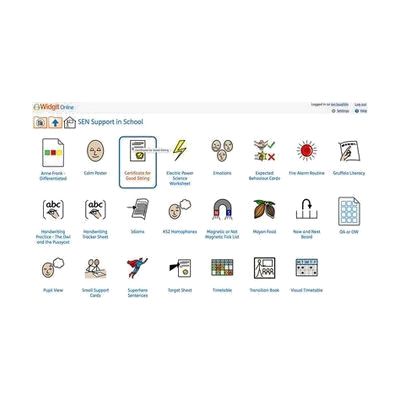
Widgit Online is a web-based tool for making materials that pair words with pictures (symbols). You can build visual timetables, communication books, flashcards, worksheets, social stories, supported reading materials, mind maps, and templates for AAC devices, either from hundreds of ready-made templates or from a blank page. It runs in a browser on a PC, Mac, or iPad, so there's nothing to install or update. It's a good fit for teachers, parents, and professionals supporting someone with communication needs, or someone building literacy skills. This is a subscription, and the activation code arrives by email after ordering. The vendor lists it for UK customers only, and an optional Dual Language Add-On translates materials into more than 80 languages.
Getting it
Many states lend devices like this for trial periods, free or at low cost — find your state's AT lending program.
Where to get it
This is the vendor WhatCanHelp tracks for this product — it may also be available from other retailers or a local supplier, and prices vary.
How to fund this
These are common places to ask about paying for equipment like this. Each one decides its own eligibility and what it covers, so start by asking them.
Details
Quick Facts Catalog facts · auto-generated
What setup looks like
- Out of the box
Once your activation code arrives by email, sign in through your web browser. Nothing needs to be installed. - With a guide
- Browse the ready-made templates and pick one close to what you need, such as a visual timetable or a set of flashcards.
- Swap in the words and symbols for your learner and print or share the result. Expect a first simple resource within about an hour.
- With professional help
A speech-language pathologist or teacher can help choose which symbols, vocabulary, and layouts fit a particular person's communication level. A first session may take about an hour.
Compare & explore
Sources & fine print
Vendor facts (name, price, platforms, vendor link) sourced from Inclusive Technology — view on vendor site (opens in a new tab); last checked October 31, 2026.
Classification & description AI-generated from vendor-published content on October 1, 2026 · confidence: high. Vendor specs may lag; verify before relying on details in a clinical or funding artifact.