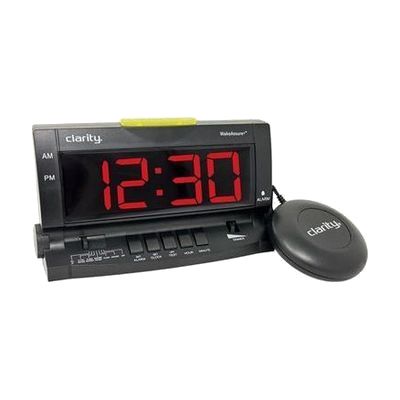
Clarity WakeAssure+ Vibrating Alarm Clock
by Clarity
Price is what the vendor listed when last checked. Confirm it with the vendor before buying.
What it is
Summary
AI-generated from vendor-published content · October 1, 2026
The WakeAssure+ wakes you with a loud alarm, a vibrating bed shaker, or both at once, so you can match it to how deeply you sleep and how well you hear. The alarm reaches 85+ dB, and you can adjust its volume and tone separately to suit your hearing. The 1.8-inch LCD is easy to read and can be dimmed at night, and a light on top shows when the alarm is going off. It also has a phone jack, so it can flash and shake for landline or videophone calls. Everything you need is in the box, including the bed shaker. A 9V battery is not included, and it keeps your time and settings during a power outage.
Getting it
Try before you buy
Devices like this are often available to borrow through your state's AT Act program — typically free or low-cost — so you can try it before buying or pursuing funding.
Where to get it
This is the vendor WhatCanHelp tracks for this product — it may also be available from other retailers or a local supplier, and prices vary.
Wondering how equipment like this gets paid for? See the official funding programs in your state.
Details
Quick Facts Catalog facts · auto-generated
- Type
- Addresses
- Platform
- Age range
- Complexity
- Ready to use
- Price
- $49.95
- Funding
- AT Act lending
- Out of pocket
What setup looks like
- Out of the box
- Plug in the AC adapter and set the time and alarm on the clock.
- Slide the bed shaker under your mattress or pillow and plug it into the clock.
- Adjust the volume, tone, and display dimmer until they feel right, then choose sound, vibration, or both.
- If you want phone alerts, connect the included telephone cord from the clock to your landline or videophone. Add a 9V battery if you want backup power.
Compare & explore
Sources & fine print
Vendor facts (name, price, platforms, vendor link) sourced from Diglo — view on vendor site (opens in a new tab); last checked October 31, 2026.
Classification & description AI-generated from vendor-published content on October 1, 2026 · confidence: high. Vendor specs may lag; verify before relying on details in a clinical or funding artifact.