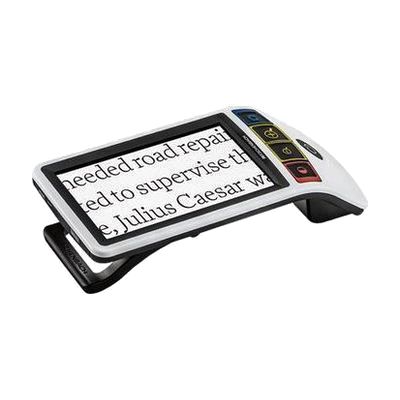
New Smartlux Digital Handheld Magnifier
by Eschenbach
Last verified June 17, 2026 · classified April 26, 2026
What it is
Summary
AI-generated from vendor-published content · April 26, 2026
The Smartlux Digital is a compact handheld video magnifier with a 5-inch HD screen that enlarges text and images in real time, with 14 color contrast modes (such as high-contrast yellow-on-black) and individually adjustable LED lighting. It's designed for someone with low vision who needs a portable solution for reading mail, labels, menus, or writing tasks throughout the day. The built-in folding stand gives it three distinct positions — handheld, flat over reading material, or angled for writing — and it connects to a TV or monitor via HDMI for larger viewing. The screen is 5 inches, which is useful on the go but noticeably smaller than a desktop video magnifier; users with more significant vision loss may find it a transitional rather than a complete reading solution.
Quick Facts Catalog facts · auto-generated
- AT Act lending
- Medicaid waiver
- Out of pocket
- Vocational rehab
What Setup Looks Like
- Out of the box
- Charge the device fully before first use.
- Unfold or adjust the stand to the desired position, power on, and point the camera at your reading material — magnification and contrast are adjusted with the four color-coded buttons on the device.
- With a guide
- Review the included quick-start guide or Eschenbach's online tutorials to learn the customizable menu, contrast modes, and HDMI output setup.
- Experiment with the 14 color contrast modes and LED brightness settings to find the combination that works best for your specific vision needs — plan 20–30 minutes for this exploration.
- See manufacturer support resources for detailed instructions.
- With professional help
- An optometrist specializing in low vision or an ATP can help determine whether this magnification range (up to approximately 14x) is appropriate for your acuity level and recommend optimal contrast settings.
- A low vision specialist can also advise whether a handheld device alone meets your needs or whether it should complement a desktop magnifier for extended reading.
Getting it
Try Before You Buy
Devices like this are often available to borrow through your state's AT Act program — typically free or low-cost — so you can try it before buying or pursuing funding.
Where to Get It
Some links may be affiliate links — WhatCanHelp may earn a small commission from purchases at no extra cost to you. More on affiliates →
As an Amazon Associate we earn from qualifying purchases.
How to Fund This
Equipment like this is often pursued through official state programs. These are common starting points — each program decides its own eligibility and what it covers, so the first step is always a phone call.
Compare & explore
Sources & fine print
Vendor facts (name, price, platforms, vendor link) sourced from Eschenbach — view on vendor site; last verified June 17, 2026.
Classification & description AI-generated from vendor-published content on April 26, 2026 · confidence: high. Vendor specs may lag; verify before relying on details in a clinical or funding artifact.