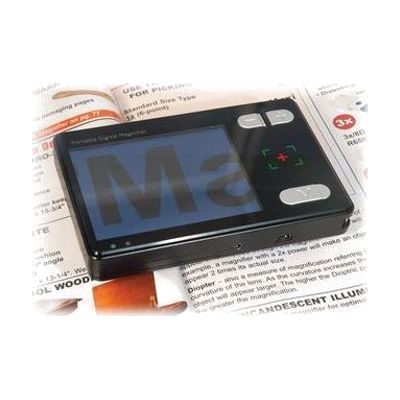
Reizen Digital video Magnifier
by Reizen
Last verified June 17, 2026 · classified April 26, 2026
What it is
Summary
AI-generated from vendor-published content · April 26, 2026
This is a handheld electronic magnifier that uses a small camera and built-in screen to display enlarged text and images in real time, making printed materials like books, labels, and handwriting readable for people with low vision. It's designed for someone who needs portable magnification throughout the day — at the grocery store, a restaurant menu, or a desk at home — and who would benefit from a device smaller and lighter than a desktop video magnifier. The package includes the magnifier, charging cable, video output cable, battery, and protective case, so it's a reasonably complete kit out of the box, though you'll need to charge the battery before first use and spend some time learning the magnification and contrast controls. At 1.2 megapixels and a small built-in display, image resolution and screen size are modest compared to mid-range competitors — the TV output option helps, but users with significant vision loss may find the screen too small for extended comfortable reading.
Quick Facts Catalog facts · auto-generated
- AT Act lending
- Medicaid waiver
- Out of pocket
- Vocational rehab
What Setup Looks Like
- Out of the box
- Insert the rechargeable battery and charge fully via the included USB cable before first use.
- Power on the device and point the camera at text or an object to see the magnified image on the built-in screen.
- Use onboard controls to adjust magnification level and color/contrast modes as needed.
- With a guide
- Connect the video output cable to an HDTV for a larger display — consult the included manual for cable and input settings.
- Use the folding bracket on the back to position the magnifier hands-free over flat documents for reading or writing tasks.
- Explore the audio guidance feature and contrast modes to find the best combination for your specific vision needs — allow 20–30 minutes to try all settings. See manufacturer support resources for detailed instructions.
Getting it
Try Before You Buy
Devices like this are often available to borrow through your state's AT Act program — typically free or low-cost — so you can try it before buying or pursuing funding.
Where to Get It
Some links may be affiliate links — WhatCanHelp may earn a small commission from purchases at no extra cost to you. More on affiliates →
As an Amazon Associate we earn from qualifying purchases.
How to Fund This
Equipment like this is often pursued through official state programs. These are common starting points — each program decides its own eligibility and what it covers, so the first step is always a phone call.
Compare & explore
Sources & fine print
Vendor facts (name, price, platforms, vendor link) sourced from Reizen — view on vendor site; last verified June 17, 2026.
Classification & description AI-generated from vendor-published content on April 26, 2026 · confidence: high. Vendor specs may lag; verify before relying on details in a clinical or funding artifact.