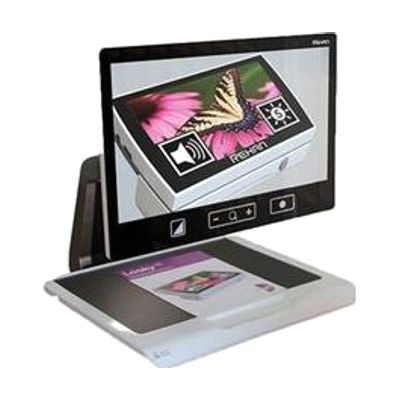
Acuity 22-inch Speech HD Desktop Video Magnifier with Wireless Remote
$3,995.00 ▲ $300.00 (8%)
Last verified July 29, 2026 · classified April 26, 2026
What it is
Summary
AI-generated from vendor-published content · April 26, 2026
This is a desktop video magnifier with a 22-inch full HD screen that enlarges printed material up to 65x and can also read text aloud using built-in OCR (optical character recognition — software that converts a camera image of text into spoken words). It's designed for someone with low vision who wants to read books, write, handle mail, or pursue hobbies at a dedicated workstation. The unit ships as a complete, self-contained system — camera, screen, lighting, and text-to-speech are all built in, and it can be operated via a tactile remote, touchpad, or the screen itself. At 35 pounds and over $3,600, this is a significant investment and a permanent fixture; it's not portable, so anyone who needs magnification on the go will need a separate solution.
Quick Facts Catalog facts · auto-generated
- AT Act lending
- Insurance
- Medicaid waiver
- Out of pocket
- Vocational rehab
What Setup Looks Like
- Out of the box
- Place on a stable desk or table with adequate surface area (unit footprint is approximately 19x19 inches).
- Plug into a standard wall outlet — the device is ready to use without additional software installation.
- Use the tactile remote or touchscreen to adjust magnification level and contrast mode.
- With a guide
- Review the user manual to configure OCR language settings and preferred contrast modes for your specific vision needs.
- Adjust the camera arm angle and LED lighting position to minimize glare on the materials you use most — allow 20–30 minutes to optimize. See manufacturer support resources for detailed instructions.
- With professional help
- A low vision specialist or certified assistive technology professional (ATP) can assess whether desktop magnification is the right primary tool versus a portable magnifier or screen reader combination.
- An OT or ATP can configure optimal magnification levels, contrast settings, and OCR language preferences to match the user's specific vision profile — typically 1 session of 1–2 hours.
Getting it
Try Before You Buy
Devices like this are often available to borrow through your state's AT Act program — typically free or low-cost — so you can try it before buying or pursuing funding.
Where to Get It
This is the vendor WhatCanHelp tracks for this product — it may also be available from other retailers or a local supplier, and prices vary.
Some links may be affiliate links — WhatCanHelp may earn a small commission from purchases at no extra cost to you. More on affiliates →
As an Amazon Associate we earn from qualifying purchases.
How to Fund This
Equipment like this is often pursued through official state programs. These are common starting points — each program decides its own eligibility and what it covers, so the first step is always a phone call.
Compare & explore
Sources & fine print
Vendor facts (name, price, platforms, vendor link) sourced from Rehan Electronics — view on vendor site; last verified July 29, 2026.
Classification & description AI-generated from vendor-published content on April 26, 2026 · confidence: high. Vendor specs may lag; verify before relying on details in a clinical or funding artifact.