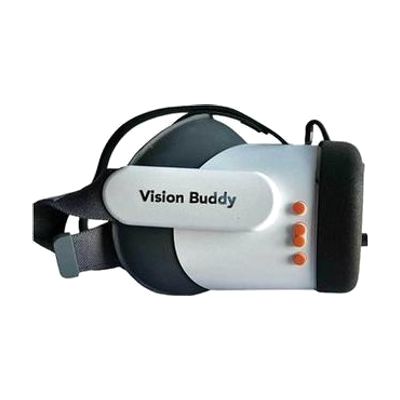
Vision Buddy V4
by Vision Buddy
Last verified July 29, 2026 · classified April 26, 2026
What it is
Summary
AI-generated from vendor-published content · April 26, 2026
The Vision Buddy V4 is a wearable headset that uses a Sony camera to magnify the world around the user — up to 10x — and display it directly in front of their eyes, along with a separate TV streaming mode that wirelessly receives video from a cable box, phone, or computer. It's designed for people with visual acuity in the 20/100 to 20/800 range who want to continue reading, watching TV, or attending outdoor events without needing to position themselves in front of a fixed monitor. The package includes the headset and a TV hub transmitter, making it a more complete solution than many competing wearable magnifiers, though setup for each mode — particularly the wireless TV streaming — takes some configuration. At nearly $4,000, this is a significant investment, and people with certain eye conditions may respond very differently to head-mounted displays, so trying before buying is strongly advisable.
Quick Facts Catalog facts · auto-generated
- AT Act lending
- Medicaid waiver
- Out of pocket
- Vocational rehab
What Setup Looks Like
- Out of the box
- Put on the headset and adjust the IPD (interpupillary distance) dial to match your eyes.
- Use the zoom in/out buttons to magnify objects in your environment — this mode works right away.
- With a guide
- Connect the included TV hub transmitter to your cable box, phone, or computer using the appropriate cable.
- Pair the transmitter to the headset following the pairing instructions in the manual.
- Test all three modes (reading, magnification, TV) and adjust settings for comfort — expect 30-60 minutes total setup time.
- See manufacturer support resources for detailed instructions.
- With professional help
- A low vision specialist or optometrist should evaluate whether a head-mounted display format is appropriate for the user's specific eye condition before purchase.
- An assistive technology professional (ATP) with low vision experience can help configure settings and train the user across all three modes — typically 1-2 sessions.
Getting it
Try Before You Buy
Devices like this are often available to borrow through your state's AT Act program — typically free or low-cost — so you can try it before buying or pursuing funding.
Where to Get It
This is the vendor WhatCanHelp tracks for this product — it may also be available from other retailers or a local supplier, and prices vary.
Some links may be affiliate links — WhatCanHelp may earn a small commission from purchases at no extra cost to you. More on affiliates →
As an Amazon Associate we earn from qualifying purchases.
How to Fund This
Equipment like this is often pursued through official state programs. These are common starting points — each program decides its own eligibility and what it covers, so the first step is always a phone call.
Compare & explore
Sources & fine print
Vendor facts (name, price, platforms, vendor link) sourced from Vision Buddy — view on vendor site; last verified July 29, 2026.
Classification & description AI-generated from vendor-published content on April 26, 2026 · confidence: high. Vendor specs may lag; verify before relying on details in a clinical or funding artifact.