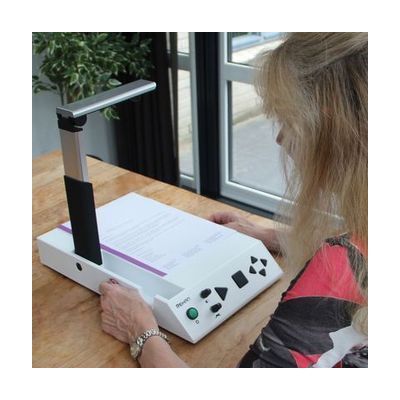
i-Reader 2 Desktop Scanner
Last verified July 29, 2026 · classified April 26, 2026
What it is
Summary
AI-generated from vendor-published content · April 26, 2026
The i-Reader 2 is a standalone desktop reading machine that places printed documents on its flat scanning surface, then reads them aloud using text-to-speech voices in a choice of 12 languages. It's designed for someone who is blind or has low vision and wants to independently read mail, books, bills, or other letter-size paper documents without needing a computer or separate software. The unit ships as a complete, self-contained system — the scanner, processor, and speakers are all integrated — and it can also connect to a monitor via HDMI or VGA so a low-vision user can follow along with highlighted text on screen. At roughly 22 inches wide and nearly 24 inches tall, this is a substantial piece of furniture that needs a dedicated desk space, and at $1,999 it's a meaningful investment compared to smartphone-based reading apps that offer similar core functionality.
Quick Facts Catalog facts · auto-generated
- AT Act lending
- Medicaid waiver
- Out of pocket
- Vocational rehab
What Setup Looks Like
- Out of the box
Place the unit on a desk, plug into AC power, and wait approximately 45 seconds for startup — then place a document under the scanner and press the scan button to hear it read aloud. - With a guide
- Connect to a monitor using the included HDMI or VGA cable if visual text display is desired.
- Review the user manual to configure preferred language, voice gender, reading speed, and volume to your preference — expect 20–30 minutes to explore all settings.
- See manufacturer support resources for detailed instructions.
- With professional help
- An orientation and mobility specialist or low vision rehabilitation therapist can assess whether this device or an alternative (video magnifier, smartphone app, or CCTV) is the best fit for the individual's specific vision profile and daily reading needs.
- Expect one consultation session of 1–2 hours before purchase to avoid a costly mismatch.
Getting it
Try Before You Buy
Devices like this are often available to borrow through your state's AT Act program — typically free or low-cost — so you can try it before buying or pursuing funding.
Where to Get It
This is the vendor WhatCanHelp tracks for this product — it may also be available from other retailers or a local supplier, and prices vary.
Some links may be affiliate links — WhatCanHelp may earn a small commission from purchases at no extra cost to you. More on affiliates →
As an Amazon Associate we earn from qualifying purchases.
How to Fund This
Equipment like this is often pursued through official state programs. These are common starting points — each program decides its own eligibility and what it covers, so the first step is always a phone call.
Compare & explore
Sources & fine print
Vendor facts (name, price, platforms, vendor link) sourced from Rehan Electronics — view on vendor site; last verified July 29, 2026.
Classification & description AI-generated from vendor-published content on April 26, 2026 · confidence: high. Vendor specs may lag; verify before relying on details in a clinical or funding artifact.