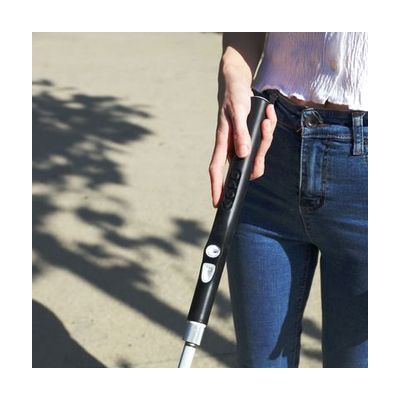
WeWalk Smart Cane 2 - 54 inches Black
by WeWALK
Price is what the vendor listed when last checked. Confirm it with the vendor before buying.
Last verified September 18, 2026 · classified April 26, 2026
What it is
Summary
AI-generated from vendor-published content · April 26, 2026
The WeWalk Smart Cane 2 is a white cane with a built-in smart handle that adds obstacle detection, GPS navigation, and real-time transit information to traditional cane travel. It uses ultrasonic sensors to detect chest- and head-height obstacles that a standard cane tip would miss, delivering warnings through vibration and sound while preserving the ground-feel that cane users rely on. It pairs via Bluetooth to a companion smartphone app, giving hands-free access to turn-by-turn directions, nearby points of interest, and live public transit schedules — you leave your phone in your pocket. At 54 inches this is sized for taller adults, and while the cane ships ready to use, getting full value from the navigation features requires downloading and configuring the WeWALK app and potentially some orientation and mobility training to integrate it into existing cane technique.
Quick Facts Catalog facts · auto-generated
- AT Act lending
- Medicaid waiver
- Out of pocket
- Vocational rehab
What Setup Looks Like
- Out of the box
- Unfold the cane and use it as a standard white cane — ground-level tactile feedback works without any setup.
- Power on the smart handle to activate obstacle detection; haptic and audio alerts begin immediately.
- With a guide
- Download the WeWALK app on a Bluetooth-compatible smartphone and pair the cane handle.
- Configure navigation preferences, transit settings, and voice assistant within the app.
- Practice using tactile buttons on the handle to trigger navigation commands without handling the phone. Allow 30–60 minutes for initial app configuration. See manufacturer support resources for detailed instructions.
- With professional help
- An orientation and mobility (O&M) specialist can integrate the smart cane into existing white cane technique and teach efficient use of the navigation and transit features in real travel environments.
- Expect 2–4 sessions with an O&M specialist over several weeks for confident independent use.
Getting it
Try Before You Buy
Devices like this are often available to borrow through your state's AT Act program — typically free or low-cost — so you can try it before buying or pursuing funding.
Where to Get It
This is the vendor WhatCanHelp tracks for this product — it may also be available from other retailers or a local supplier, and prices vary.
Some links may be affiliate links — WhatCanHelp may earn a small commission from purchases at no extra cost to you. More on affiliates →
As an Amazon Associate we earn from qualifying purchases.
How to Fund This
Equipment like this is often pursued through official state programs. These are common starting points — each program decides its own eligibility and what it covers, so the first step is always a phone call.
Compare & explore
Sources & fine print
Vendor facts (name, price, platforms, vendor link) sourced from WeWALK — view on vendor site; last verified September 18, 2026.
Classification & description AI-generated from vendor-published content on April 26, 2026 · confidence: high. Vendor specs may lag; verify before relying on details in a clinical or funding artifact.