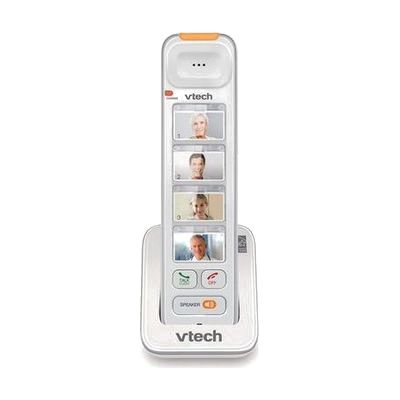
VTech Amplified Photo Dial Big Button Accessory Handset
by VTech
Price is what the vendor listed when last checked. Confirm it with the vendor before buying.
Accessory or replacement part Made to go with another product — check it fits what you have.
Last verified September 18, 2026 · classified April 26, 2026
What it is
Summary
AI-generated from vendor-published content · April 26, 2026
This is a cordless phone handset with large buttons, photo speed-dial labels, and built-in call amplification designed for people who have difficulty hearing telephone conversations or reading small standard phone buttons. It's well suited for older adults or anyone with mild-to-moderate hearing loss or low vision who wants to see a familiar face on the speed-dial keys and hear calls more clearly. Important to know up front: this is an accessory handset only — it does not work on its own and must be paired with a compatible VTech base station from the DS6*** series, which is sold separately. The visual ring indicator on top flashes for incoming calls, which adds a basic alerting feature, but anyone needing full hearing accessibility (bed shaker, very loud ringer) should look at a more dedicated amplified phone system.
Quick Facts Catalog facts · auto-generated
- Out of pocket
What Setup Looks Like
- Out of the box
Press the registration button to pair the handset with a compatible VTech base station — takes about 2 minutes once the base is nearby. - With a guide
- Confirm your existing or purchased VTech base station is compatible with this accessory handset (check model numbers in documentation).
- Insert photos or name labels into the photo-dial windows on the handset.
- Program speed-dial entries through the base station menu — allow 15–20 minutes total setup. See manufacturer support resources for detailed instructions.
Getting it
Many states lend devices like this for free trial periods — find your state's AT lending program.
Where to Get It
This is the vendor WhatCanHelp tracks for this product — it may also be available from other retailers or a local supplier, and prices vary.
Some links may be affiliate links — WhatCanHelp may earn a small commission from purchases at no extra cost to you. More on affiliates →
As an Amazon Associate we earn from qualifying purchases.
Wondering how equipment like this gets paid for? See the official funding programs in your state.
Compare & explore
Sources & fine print
Vendor facts (name, price, platforms, vendor link) sourced from VTech — view on vendor site; last verified September 18, 2026.
Classification & description AI-generated from vendor-published content on April 26, 2026 · confidence: high. Vendor specs may lag; verify before relying on details in a clinical or funding artifact.