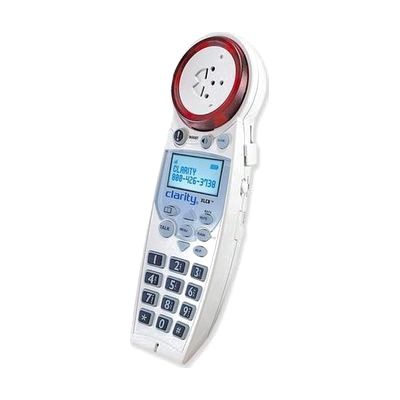
New Clarity XLC8HS Dect 6.0 X-Loud Big Button Speaker Phone Handset
by Clarity
Price is what the vendor listed when last checked. Confirm it with the vendor before buying.
Accessory or replacement part Made to go with another product — check it fits what you have.
What it is
Summary
AI-generated from vendor-published content · October 1, 2026
This is an extra cordless handset for the Clarity XLC8 amplified phone, with a speakerphone for hands-free calls. It has a high-contrast Caller ID screen with large text, talking Caller ID, and a talking, lit-up dial pad. The ringer is extra loud and flashes, and it has a voicemail indicator. It can connect straight to a headset or assistive listening device through a 2.5mm or 3.5mm jack, and an extra neck loop is included. It's built for someone who is hard of hearing and wants another loud, easy-to-read phone in a second room. It does not work by itself, so you need an XLC8 base phone to pair it with.
Getting it
Where to get it
This is the vendor WhatCanHelp tracks for this product — it may also be available from other retailers or a local supplier, and prices vary.
Wondering how equipment like this gets paid for? See the official funding programs in your state.
Details
Quick Facts Catalog facts · auto-generated
- Addresses
- Platform
- Complexity
- Setup with instructions
- Price
- $109.95
- Funding
- AT Act lending
- Out of pocket
What setup looks like
- Out of the box
Put the batteries in and charge the handset as the instructions describe. - With a guide
- Register the handset to your XLC8 base so the two can talk to each other.
- Choose your screen language, ringer tone, and talking Caller ID and dial pad settings.
- If you use a headset or assistive listening device, plug it into the jack, or put on the neck loop. Allow about 30 minutes in all.
Compare & explore
Sources & fine print
Vendor facts (name, price, platforms, vendor link) sourced from MaxiAids — view on vendor site (opens in a new tab); last checked November 2, 2026.
Classification & description AI-generated from vendor-published content on October 1, 2026 · confidence: high. Vendor specs may lag; verify before relying on details in a clinical or funding artifact.