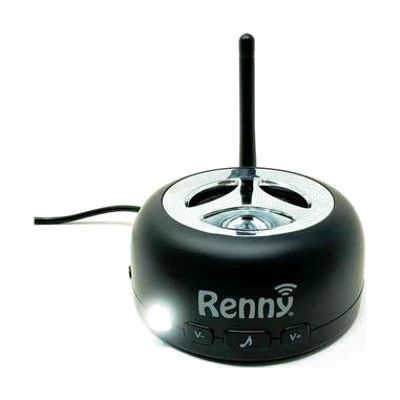
RENNY JR-The Loud Cell Phone Ringer, Amplifier and Flasher
Price is what the vendor listed when last checked. Confirm it with the vendor before buying.
What it is
Summary
AI-generated from vendor-published content · October 1, 2026
The Renny JR is a loud ringer that connects to your cell phone over Bluetooth and rings and flashes a white light when a call comes in. That way you can hear or see the call even if your phone is on silent, in another room, or out in the garage. You can pick from 5 built-in ringtones, and it can announce the caller's number out loud. It has two modes: Ring mode, where only the ringer sounds, and Music mode. After you pair it once, it reconnects on its own whenever the phone is within about 150 feet, so placing it near the middle of the home works well. You can also link two units to the same phone and they ring together, which helps cover a bigger space. It pairs with one phone at a time.
Getting it
Try before you buy
Devices like this are often available to borrow through your state's AT Act program — typically free or low-cost — so you can try it before buying or pursuing funding.
Where to get it
This is the vendor WhatCanHelp tracks for this product — it may also be available from other retailers or a local supplier, and prices vary.
Wondering how equipment like this gets paid for? See the official funding programs in your state.
Details
Quick Facts Catalog facts · auto-generated
- Type
- Addresses
- Platform
- Age range
- Complexity
- Setup with instructions
- Price
- $69.99
- Funding
- AT Act lending
- Out of pocket
What setup looks like
- With a guide
- Plug in the unit and put it in a central spot where you spend most of your time.
- Pair it with your phone through the phone's Bluetooth settings. You only need to do this once, and it should reconnect on its own after that.
- Pick a ringtone and a mode, and turn on the talking caller ID if you want it. Plan on about 20-30 minutes, including a test call. See manufacturer support resources for detailed instructions.
Compare & explore
Sources & fine print
Vendor facts (name, price, platforms, vendor link) sourced from MaxiAids — view on vendor site (opens in a new tab); last checked November 2, 2026.
Classification & description AI-generated from vendor-published content on October 1, 2026 · confidence: high. Vendor specs may lag; verify before relying on details in a clinical or funding artifact.